noesia

Noesia Smart Waiter / Module Documentation
Pro Event-Driven IoC Isolated/X-Core Micro-Frontend Real-Time Hospitality Execution

LIVE COMMAND

Live Command is the flagship real-time service engine inside Noesia Smart Waiter. It transforms a simple QR scan into a live operational surface where guests can call staff, request service, open the menu, review allergens, ask for the bill, access venue conveniences such as Wi-Fi information, listen to linked music experiences, and move into a faster payment flow without app downloads or heavy hardware dependence. From restaurants and cafés to beach bars, hotels, pool bars, rooms, lounges and night clubs, Live Command is designed to reduce friction, reduce missed requests, increase speed, increase revenue opportunities, and give modern hospitality venues a high-tech service experience that still feels human.

Primary role Real-time guest-to-staff execution surface
Key live areas QR, requests, orders, bill, payments, monitor
Best for Restaurants, cafés, hotels, pool bars, beach bars, clubs

One Plugin. Infinite Scenarios. Saturday night restaurant rush. Sunny hotel pool. Busy morning café. Beach service. Room service. Bottle service. Table calls. Bill requests. Fast digital payment. Live Command adapts to the environment instead of forcing the venue to adapt to rigid software.

More than a menu. Live Command turns the guest’s phone into a digital butler that can request service instantly, keep service flowing, reduce shouting and chasing, and make the venue feel modern, calm, fast and premium.

Live Command Deep Dive

See more about how Live Command works

Open the dedicated presentation and discover the real-time service flow, customer request logic, and how Live Command operates inside the Noesia Smart Waiter ecosystem.

Open Full Presentation
Pro Tip: 99% of issues are solved by clearing your browser cache and cdn / WordPress cache!
Who is it for

Built for venues that want faster service, calmer operations, and stronger revenue flow

Restaurants, cafés and taverns

Ideal for busy floor service where speed, clarity and missed-request prevention matter. Guests scan once and can call staff, order again, review the menu, ask for the bill, and move through service without chasing a waiter or interrupting a packed shift.

Beach bars, pool bars and resorts

Perfect for sunbeds, outdoor lounge areas, private cabanas and poolside service. Guests do not need to leave their place, search for staff or wait for eye contact to request a cocktail, extra order, service call or bill.

Hotels, room service and clubs

Powerful for room service, hotel lounges, event venues and night clubs. Guests can request help, browse offerings, trigger service actions and keep the experience modern, premium and high-tech without app downloads or hardware-heavy workflows.

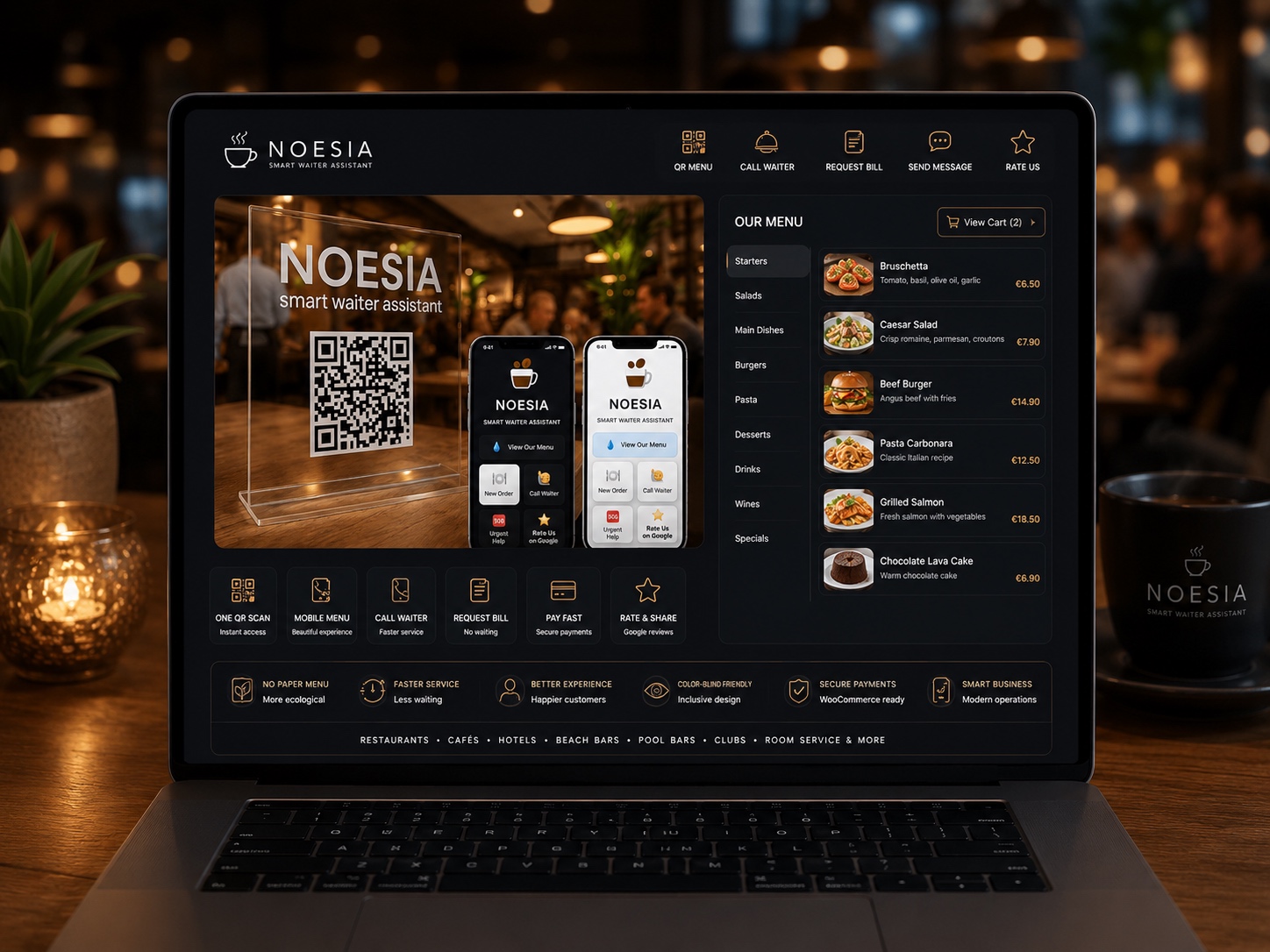
Noesia Desktop Core Engine
SYS.CORE // ACTIVE
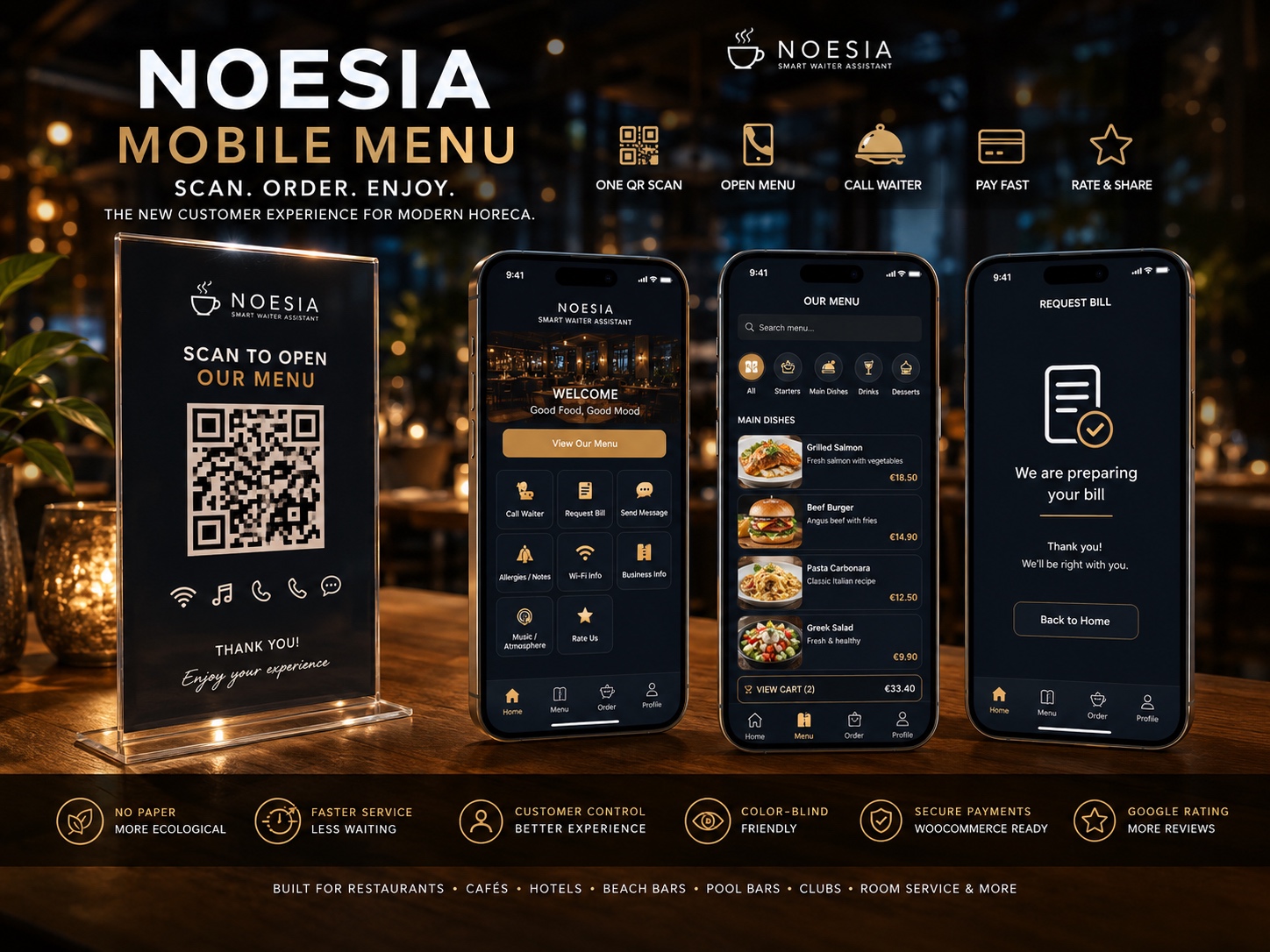
Noesia Mobile Menu Node
NODE.MOBILE // SYNCED
Main Features

What Live Command actually delivers in real hospitality environments

Scan & Order instantly

  • Customers scan the table or zone QR code directly with their phone camera.
  • No app download is required.
  • The guest page opens directly in the browser and can immediately surface the relevant actions.
  • Built for real life: fast, clear, and friction-light from the first tap.

More than a menu — your digital butler

  • Call waiter, ask for the bill, trigger custom actions and open the digital menu in a single surface.
  • Menu and allergen visibility can live next to service actions instead of being isolated in a static PDF-only experience.
  • Wi-Fi codes, service guidance, hospitality notes and useful venue information can be surfaced right where the guest needs them.
  • Optional music or lounge links can enrich the venue experience directly from the same guest-facing flow.

Real-time kitchen, bar and staff sync

  • Requests and orders are sent instantly to the live monitor without requiring manual refresh loops.
  • Staff can work from a live board that shows what table or zone needs what, now.
  • Sound notifications help teams react faster in real service conditions.
  • Request tracking and state visibility help reduce missed calls, repeated table confusion and unnecessary staff running.

Payment flow without traditional queue friction

  • Live Command can support cash or online payment flows depending on venue choice and configuration.
  • For QR-first venues, the experience can reduce dependence on traditional queue-based payment behavior and dedicated terminal friction.
  • Digital receipt delivery can reduce SMS cost and delay when the configured delivery flow does not rely on SMS collection.
  • Paper dependence can be reduced, helping venues move toward cleaner and more modern service workflows.

Owner insight: Live Requests Panel

  • Full activity overview for active and past requests in one place.
  • Per-table order and request history to clarify disputes, charges or sequence of events.
  • Per-area insight for restaurant, pool, beach, room service or any mapped venue zone.
  • Per-employee handling visibility for workload balancing and team review.
  • Daily and seasonal trend awareness for planning staffing and improving operational timing.

Secure, lightweight & revenue-focused

  • Anti-abuse protection helps rate-limit malicious tap-spamming, with temporary blocking for repeated abuse patterns.
  • Old request data can be auto-cleaned every 15 days to keep the database lighter and reduce useless long-term clutter.
  • Flexible sound alerts let staff match the venue atmosphere while staying responsive.
  • Optimized code and self-hosted logic keep the product practical even for venues on lighter hosting environments.
  • Revenue-focused design encourages faster repeats such as “one more drink”, “one more dessert” or “bill now” without delay.

QR Studio and zero-hardware deployment logic

  • Built-in QR Studio can generate large printable QR batches in one action instead of creating codes manually one by one.
  • Useful for table ranges, sunbeds, room numbers, service spots and multi-zone hospitality layouts.
  • No special customer hardware is needed; the guest uses a normal smartphone and staff can work from tablets or common screens.
  • Live Command is built to feel plug-and-play inside a WordPress site rather than a heavy enterprise deployment project.

Accessibility, customization and reputation flow

  • Custom branding, icons and colors help the venue align the service surface with its identity.
  • Color-blind-friendly menu support and badge-oriented accessibility messaging help venues communicate respect and inclusion.
  • Reputation-oriented flows can guide satisfied guests toward better review outcomes.
  • Translation-ready behavior supports multilingual hospitality environments and broader guest reach.
NOESIA SMART WAITER · FREE VS PRO

Compare the Free Edition with the full Pro Business Stack

Both editions include the core Design / Customer Menu layer: your branding, logo, colors, menu link, customer action buttons, review CTA, custom quick actions, and the shared live-request interface. Pro keeps everything from Free and adds the premium Live Command layer with direct payments, receipts, accessibility tools, WiFi, music, messaging, safety tools, and deeper operational control.

What the upgrade changes in practice

Free gives you the branded guest surface. Pro turns it into a more complete hospitality operating layer, especially for venues that want payment handling, accessibility, guest communication and stronger backend control.

💳 Stronger payment flow with WooCommerce + Cash
👁️ Accessibility suite with Color Mode + Camera Audit
🧾 Receipt delivery on the guest surface without SMS dependence
🛎️ Live backend command center for tables, notes and payments

Everything from Free stays active in Pro

The Pro edition does not remove anything from the Free design layer. It preserves the same customer branding system, QR-driven guest flow, button customization, colors, quick actions, menu/catalog link, review button and base live-request experience, then builds advanced tools on top of it.

✓ Branding & Logo ✓ Menu / PDF / Catalogue Link ✓ Call Waiter / New Order / Bill ✓ 2 Custom Quick Actions ✓ Review CTA ✓ Color Palette & Text/Icon Editing
Feature
Free
Pro
What Pro adds or expands
Shared Core
Brand setup, logo, colors and customer page identity
Shop name, logo URL, background/title/text colors and the base customer-facing design layer.
✓
✓
Pro keeps the full free design system active and uses it as the base surface for the premium tools.
Shared Core
Menu button, menu visibility and menu/PDF/catalogue URL
The guest can open your menu or external catalogue directly from the branded customer screen.
✓
✓
Useful in both editions. Pro then layers extra guest tools on the same menu surface, including accessibility and payment actions when enabled.
Shared Core
Action buttons and texts
Customize labels and icons for View Menu, New Order, Call Waiter, Bill Please, plus Restore Texts & Icons.
✓
✓
Pro includes the same editable core actions, then adds extra premium actions like payments, WiFi, Safety Shield, message box and accessibility tools.
Shared Core
Two custom quick actions + Google review CTA
Extra quick buttons and optional Rate Us on Google call-to-action for guest engagement.
✓
✓
These remain available in Pro, so the premium edition still keeps the marketing and branding CTA layer from Free.
Shared Core
Basic live-request behavior and sound alerts
Free includes the base live-request behavior and a basic sound on/off setting in the design layer.
✓
✓
Pro expands the sound layer with alert presets, custom uploads and music tooling for a richer experience.
Pro Only
Full Live Command backend management
A dedicated admin layer for real-time venue operations.
✕
✓
Live Command Center with active request count, auto-refresh, sound toggle and grouped live activity for tables or rooms from one backend control space.
Pro Only
Send Message / two-way guest communication
Lets the venue and the table exchange notes inside the Live Command flow.
✕
✓
Adds a message thread and message box so guests can send text requests and staff can answer without forcing every interaction into a button-only flow.
Pro Only
Cash Payment workflow
Built for venues that still want a cash path but need a cleaner table-side digital flow.
✕
✓
Cash Payment can send the amount to the guest, wait for guest confirmation, and let staff mark cash as received from the backend workflow.
Pro Only
Online Payment with WooCommerce
A stronger digital payment path for venues that want direct online checkout from the table.
✕
✓
WooCommerce checkout integration, payment return URL support, guest checkout handling, order linkage and a more modern table-side payment path that can reduce reliance on separate POS handoffs.
Pro Only
Woo order visibility and Woo email controls
Extra operational control for Live Command payment orders.
✕
✓
Control whether Live Command payment orders appear in WooCommerce orders and whether standard Woo emails remain off or are explicitly enabled for this payment flow.
Pro Only
Receipt delivery without SMS dependence
Digital receipt handling directly inside the Live Command experience.
✕
✓
Staff can upload and send a PDF or image receipt so the guest can view the receipt on the digital surface, without needing SMS hardware logic.
Pro Only
WiFi sharing tool
Guest-facing WiFi action driven by saved SSID and password settings.
✕
✓
Adds a dedicated WiFi action when SSID details are configured, making venue connectivity part of the guest menu experience.
Pro Only
Music tools and richer sound system
Premium soundscape controls for ambience and operational alerts.
✕
✓
Supports Music URL, admin music controls, and richer alert options including bundled presets and custom MP3 uploads or URLs.
Pro Only
Safety Shield
A dedicated guest safety / dietary / special-needs request layer.
✕
✓
Safety Shield can expose configurable options such as dietary or sensitivity signals and lets guests send these needs directly through the Live Command flow for faster staff awareness.
Pro Only
Accessibility Suite · Color Mode filters
Guest-facing visual aids for users with color vision deficiencies.
✕
✓
Adds Color Mode filters such as Protanopia, Deuteranopia, Tritanopia and Monochromacy so guests can read and interact with the menu in a friendlier way.
Pro Only
Camera-based Color Audit
A live visual audit tool for guests inside the venue.
✕
✓
Uses the device camera to open a split-screen audit so users can compare normal view with simulated color-blind filters in real time for menus and physical surroundings.
Pro Only
COLOR-BLIND FRIENDLY BUSINESS venue badge
A marketing-ready pro identity banner for accessible hospitality positioning.
✕
✓
Lets the Pro experience communicate that the venue supports color-blind friendly service, which is especially strong for menu reading and in-store visual interpretation.

💳 Why payments deserve extra emphasis

Pro is not just a prettier menu. It turns the customer surface into a stronger payment lane by combining a Cash Payment workflow with WooCommerce-powered Online Payment. This helps the venue move away from awkward manual payment handoffs and creates a cleaner digital path from table request to checkout and receipt.

🛡️ What Safety Shield is for

Safety Shield gives the guest a clearer way to communicate needs that should not get lost in a noisy venue: dietary restrictions, ingredient concerns, special requests, sensitive preferences or similar safety-oriented signals configured by the business.

👁️ Why the accessibility layer matters

The Pro accessibility layer is meaningful because it does two things: it improves the digital menu view itself with color filters, and it can open the camera audit so users in the venue can better interpret the real-world scene around them as well.

Start with the full Pro workflow

Get the full stack: payments, receipts, accessibility, guest messaging, WiFi, music, Safety Shield and the premium Live Command backend layer.

Edit the button URLs below to match your pricing, trial or checkout destination.
Quick Product Overview

Smart Waiter Assistant – The Ultimate Digital Concierge for WordPress

QR Menu • Live Waiter Calling • Digital Room Service • Google Reviews Booster

Turn your WordPress site into a powerful Hospitality App in minutes. No expensive hardware required.

Smart Waiter Assistant is not just a QR menu. It is a complete Live Request System for Restaurants, Beach Bars, Hotels, and Cafes. It allows customers to call a waiter, ask for the bill, or order items directly from their smartphone—without downloading any app.

🔥 Killer Feature: Built-in QR Studio

Forget creating QR codes one by one. Our unique QR Studio Generator creates printable QR cards for all your tables (e.g., Table 1 to Table 100) in a single click! Just print and stick.

How it works in real life

A flow that both guests and staff understand instantly.

  • Guests scan the QR code and can request a waiter, place a new order, or ask for the bill.
  • Staff see everything on a Live Board, with sound notifications for new requests.
  • Perfect for cafés, beach bars, taverns, pool bars, hotels, and clubs.
  • 2-minute installation – no changes needed to your POS or existing hardware.

More than a simple QR menu

Classic QR Menus

In most cases, guests scan the code and simply see a static menu or a PDF. There is no real connection with the staff – calls, requests, and bill handling still happen the old-fashioned way.

Smart Waiter Assistant
  • Connects guests with staff in real time. Waiter calls, new requests, and bill actions all happen from the guest’s phone.
  • Organizes the venue. The Live Monitor shows which table needs what, so no request is forgotten.
  • Increases revenue. Guests are more likely to order “one more drink” or “a dessert” when they don’t have to chase a waiter.
  • Reduces stress. Fewer shouts, less running, calmer shifts for everyone.

Key Features

  • Zero Hardware Needed: Works on any smartphone (Client) and any tablet/laptop (Staff).
  • Real-Time Live Dashboard: Staff sees requests instantly via AJAX (no page reload needed).
  • Sound Alerts: "Ding!" notification when a new request arrives (Staff Dashboard).
  • Beautiful Mobile Menu: App-like experience for customers with Emoji icons & Dark Mode support.
  • Room Service Mode: Perfect for Hotels. Guests can scan a code in their room to request service.
  • Reputation Manager: Smart "Rate Us on Google" button to boost your 5-star reviews.
  • Digital Menu Link: Optional button to link your full PDF menu or Catalogue.
  • Fully Customizable: Change colors, icons, texts, and logos directly from the Admin Panel.
  • Translation Ready: Includes .pot file for easy translation to any language.
Security / Local Logic

🔒 100% Local & Secure Architecture

Unlike other plugins, Noesia Smart Waiter generates all QR codes and assets locally on your server. We do not rely on external APIs or third-party services. This architecture ensures your menu loads instantly, your data remains private, and you are fully protected against downtime.

✅ Zero External Dependencies 🚀 Lightning Fast Performance 🛡️ GDPR Compliant (No Data Tracking)

🛡️ Security & Anti-Spam Protection

The plugin includes a built-in "Smart Shield" to prevent customers from spamming.

  • Cooldown: 15-second mandatory wait between requests.
  • Volume Limit: Max 20 requests per hour per device.
Smart Shield Anti-Spam Logic
An advanced protection layer designed to safeguard your server from malicious bots and automated spamming attempts. By intelligently monitoring traffic patterns, Smart Shield prevents server overloads and ensures 100% availability for genuine customers.
Adaptive Rate Limiting
Precision-engineered request management. The system enforces a 15-second mandatory cooldown between consecutive actions and a strict limit of 20 requests per hour per user. All limits are tracked via a high-performance database sync for absolute accuracy and zero bypass potential.
Device-Specific Tracking
Granular security that targets the source. Rate limits are applied individually per device by tracking IP addresses and User Agents. This ensures that even if one user is flagged for spamming, your system remains perfectly accessible and lightning-fast for everyone else.

Note: Administrators are excluded from limits for testing.

GDPR Note: This plugin stores IP addresses temporarily (transients) solely for security and anti-spam purposes. It does not track user behavior or store personal data permanently.

🛡️ Enterprise-Grade Security & Clean Code Architecture

Smart Waiter is built with a Security-First approach, strictly adhering to the highest WordPress Coding Standards.

  • Fortified Security: We utilize $wpdb->prepare() statements to block SQL Injections and advanced Data Sanitization to prevent XSS attacks.
  • Hacker Proof: Every action is protected by Nonce Verification and strict User Capability Checks (current_user_can).
  • Zero Conflicts: Fully namespaced code (noesia_) and strictly scoped CSS to prevent style bleeding.
  • Anti-Direct Access Shield: All files are protected against direct execution (ABSPATH protection).
  • Zero Console Errors: Clean, optimized JavaScript execution without console warnings or debug notices.
  • 100% Local Assets: No external CDNs. All libraries are self-hosted for better performance and GDPR compliance.

Rest assured, you are using professional-grade software designed for stability, speed, and safety.

How to Access It

Where Live Command lives in admin, public QR flow and daily operations

Admin path: open the Noesia Smart Waiter admin shell and select Live Command from the module navigation.

Tier: this module belongs to the Pro layer.

Customer surface: the public guest flow can be published through the client-facing page and QR deployment logic.

Staff surface: the venue can run a live monitor page that acts as the real-time board for incoming requests and orders.

Core shortcodes: venues commonly work with

Noesia

Table
📜 View Our Menu
⭐ Rate Us on Google
➜
for the customer side and

⚡ Live Command

Real-time requests grouped by table or room.

Online
● LIVE COMMAND CENTER
0 active requests Auto-refresh active
Connecting to tables...
for the live monitor side, depending on the deployment model used in the installation.

Setup / Configuration

Recommended setup before Live Command goes into a real venue

01

Create the customer and staff pages

Set up the public customer menu/request page and the staff monitor page first, so the venue has a clean front surface and a working response board before printing any QR codes.

02

Configure actions, labels and visual identity

Adjust the button labels, colors, icons, live request texts and guest-facing action set so the venue sees exactly the experience it wants guests to use.

03

Map tables, zones or service points

Use QR Studio to generate the codes for tables, sunbeds, rooms, private areas or service zones. Keep naming consistent so staff can respond without ambiguity.

04

Connect menu, payment and convenience flows

Link the venue menu or catalogue, configure the bill logic, connect the payment behavior used by the business, and decide whether Wi-Fi information, music links or extra guest utilities will be shown.

05

Test the real operational path

Run a full scan-to-request-to-monitor test in the actual venue before go-live. Check sound alerts, request visibility, table naming clarity and how quickly staff can act from the live board.

Quick Start

⚡ Quick Installation Summary

Get your Smart Waiter Assistant up and running in less than two minutes.

  • Log in to your WordPress Dashboard → Plugins → Add New → Upload Plugin.
  • Select the file noesia-swa.zip and click Install Now.
  • Activate the plugin — a new menu Smart Waiter appears on your sidebar.
  • Open Smart Waiter → Settings and customize your brand, colors, and sound.
  • Create two pages using shortcodes:
    • Staff Dashboard: [noesia_swa_client] (or as shown in the backend tab "How to use")
    • Staff Dashboard: [noesia_swa_dashboard] (or as shown in the backend tab "How to use")
  • Use Smart Waiter → QR Studio to generate your printable QR codes.
That’s it! You can now test live orders between your phone (Customer page) and your tablet or laptop (Staff Monitor).
Tip: If you see any “ZIP archive not found” error, make sure you uploaded the plugin ZIP file directly,

2. Creating the Front-End Pages (Shortcodes)

Smart Waiter Assistant needs two pages: one for your staff dashboard and one for the customer menu / actions.

A. Staff Dashboard Page (Private)

  1. Create a new page (e.g. “Live Monitor”).
  2. Paste the following shortcode into the content area:
[noesia_swa_dashboard]

Set this page to Password Protected (or restrict it to logged-in staff) so only your team can access it.

B. Customer Menu Page (Public)

  1. Create another page “/Smartmenu”
  2. Paste the following shortcode into the content area:
[noesia_swa_client]

This page will be used as the target URL for your QR codes, so customers can: call a waiter, place a new order, or request the bill directly from their phone.

3. Connect the QR Codes

  1. Go to Smart Waiter > QR Studio in your WordPress admin.
  2. Set the Base URL to the Customer Menu page you just created.
  3. Choose a label such as “Table” or “Room” and define the number range (e.g. 1–50).
  4. Click Generate Printable Page and print your QR cards.
That’s it! After these three steps, your guests can use their phones to connect with your staff, and your team can manage all activity from the Live Monitor dashboard.

Customize Your Brand

Navigate to the "Settings & Design" tab.

  • Shop Name & Logo: Enter your details.
  • Colors: Use the color pickers to match your brand.
  • Actions: Customize icons (emojis) and text for "Call Waiter", "Bill", etc.
Why is the menu not appearing after adding the shortcode?
Please double-check the shortcode syntax and ensure the page slug is set exactly to /smartmenu. The system is strictly designed to function only on a page with this specific URL structure.
How to Use It

Typical real-life flow from QR scan to completed service

Step 1

Guest scans the QR code

The guest uses the phone camera and opens the Live Command surface directly in the browser without downloading an app.

Step 2

Guest selects the needed action

The guest can call a waiter, open the menu, ask for the bill, trigger a custom request, review venue information or move into a service step that fits the context.

Step 3

Staff see the request live

The request appears on the live monitor with the relevant table or zone context so the team can react immediately instead of missing the signal.

Step 4

Venue serves, confirms or upsells

The staff member can execute the service, resolve the request, support an upsell moment, or move the guest smoothly toward the next step of the visit.

Step 5

Billing and closing happen faster

The venue can close the loop with a faster bill request experience and, where configured, a simpler digital payment and receipt delivery path that reduces delay and friction.

Screens / Interface Guide

The interface areas that make Live Command so powerful

Customer request surface

The guest-facing page is where the experience begins. This is where the customer scans, opens the live service options, and interacts with the venue instantly.

Action button layer

Core actions such as call waiter, bill please, menu, allergens and custom requests sit in a clear button-driven layout designed to be fast under real venue pressure.

Digital menu and guest utilities

The menu/catalouge access can sit next to useful venue conveniences such as Wi-Fi information, music links and service notes, creating a broader hospitality experience than a static PDF alone.

Live monitor board

The staff-facing live board is the execution center. It gives the team immediate visibility into requests and helps prevent missed calls during busy periods.

Live Requests Panel

The owner or manager dashboard is where the venue reviews activity history, request patterns, table behavior and operational trends beyond the live moment.

QR Studio deployment area

The QR generation area accelerates rollout. Instead of generating codes one by one, the venue can prepare its operational QR layer in bulk.

Design / branding control

The venue can align the interface with its brand by controlling colors, labels, button language and overall guest-facing tone without breaking the fast service logic.

Payment and receipt experience

This is the surface where venues can reduce unnecessary delay, cut out paper-heavy habits, avoid SMS dependence where not needed, and move guests toward a cleaner completion path.

The Staff Dashboard

This is where your waiters manage orders in real-time.

  • Real-Time: Orders appear instantly via AJAX.
  • Sound Alerts: A "Ding" sound plays for new orders.
Important: Staff must click the "Enable Sound" button at the start of every shift.

How it Works (3 Simple Steps)

  1. Setup: Create a "Staff Monitor" page and a "Customer Menu" page using our simple shortcodes.
  2. Print: Use the built-in QR Studio to generate codes for all your tables/rooms instantly.
  3. Serve: Waiters get instant sound alerts on their tablet when a customer needs them. Speed up service & increase turnover!

Perfect For: Restaurants & Cafes, Beach Bars, Hotels, Clubs.

Common Workflows

Real-life scenarios where Live Command changes the whole service experience

Saturday night restaurant rush

The restaurant is packed, staff are running, and lost seconds turn into lost orders. Live Command reduces those blind spots by giving guests a direct line into service actions instead of hoping someone notices their hand or their frustration.

Hotel pool and beach bar service

Guests want a drink but do not want to leave the sunbed or hunt for a waiter. A simple scan opens the service surface and lets the venue answer poolside or beachside requests faster and more elegantly.

Room service and private hospitality zones

Room service becomes more practical when the room QR code is already waiting in the environment. The guest scans, reviews what is available, and requests service without calling the desk for every small need.

Fast bill request and cleaner payment closure

Guests do not need to chase the bill or wait in a payment line. Live Command helps the venue shorten that final friction point and move the guest smoothly toward a quicker close of the visit.

Venue information without noise

Instead of answering the same questions again and again, venues can surface menu guidance, allergen visibility, Wi-Fi codes, accessibility messaging and hospitality utilities in the same digital surface the guest is already using.

Accessible, respectful service communication

With accessible menu support and badge-style inclusion messaging, a venue can show that it respects different guest needs while still keeping service fast, elegant and operationally simple.

Live Command Deep Dive

See more about how Live Command works

Open the dedicated presentation and discover the real-time service flow, customer request logic, live request handling model, QR deployment strategy and how Live Command operates inside the wider Noesia Smart Waiter ecosystem.

This is where the product becomes explosive in real operations: service speed, calmer staff movement, better upsell timing, cleaner bill closure, guest convenience, lighter infrastructure, and a visibly more modern hospitality experience.

Why it matters commercially

Slow service kills repeat orders. Live Command is designed to reduce those dead moments when a guest wants something but the venue does not know it yet. That is where extra drinks, desserts, bottle service and higher satisfaction are often won or lost.

Why it matters operationally

Shouting, running, guessing and missed calls create stress. Live Command replaces that chaos with a cleaner, calmer and more visible request pipeline that staff can actually manage.

Troubleshooting

Common problems, likely causes, and the first fix path

The guest QR page opens but actions do not work

Issue: the customer-facing page loads, but requests are not executed correctly.

Why it happens: the client page may be published without the correct shortcode or the module setup may be incomplete.

What to do: verify the customer page shortcode, confirm the module is active, and retest the full scan-to-request path from a phone.

Staff do not hear sound alerts

Issue: requests arrive but the team does not hear the sound notification.

Why it happens: browser audio permissions, device mute state or venue-selected sound settings may block playback.

What to do: confirm sound is enabled, test the device volume and browser audio state, and verify the monitor screen is the active staff surface being used.

QR codes open the wrong place or wrong table

Issue: the scan opens a page, but the mapped location or table feels wrong.

Why it happens: the printed code may belong to another table or the QR range may have been deployed with inconsistent naming.

What to do: regenerate and reprint the affected codes, then verify the physical placement matches the digital mapping before service starts.

Billing or payment flow feels incomplete

Issue: the guest can request the bill, but the expected payment or digital receipt flow is not behaving as planned.

Why it happens: the venue’s connected payment and completion setup may not yet be configured to match the desired closing workflow.

What to do: review the payment settings, receipt delivery method and end-of-flow design configuration, then run a fresh test order with the real live path.

Guests keep spamming the buttons

Issue: repeated abuse attempts create noise on the monitor.

Why it happens: some users may tap repeatedly or intentionally abuse request buttons.

What to do: rely on the anti-abuse protection and review whether the action surface needs better guest guidance or venue-specific instruction text.

The plugin feels heavy on shared hosting

Issue: the venue worries about hosting load.

Why it happens: operators often assume real-time features must be heavy.

What to do: confirm the installation is using the optimized self-cleaning request logic and that old request data is being purged correctly instead of accumulating indefinitely.

Internet goes down during service

Issue: the digital workflow cannot continue during an outage.

Why it happens: Live Command depends on the server connection and browser access path.

What to do: serve traditionally until connectivity returns. Once the connection is back, the digital workflow continues without needing a full manual reset.

The page looks wrong after custom embedding

Issue: spacing, visual hierarchy or button styles look broken in a custom theme or page builder context.

Why it happens: aggressive external CSS may be overriding the namespaced surface.

What to do: keep the snippet self-contained inside the wrapper and avoid generic theme selectors that collide with the module UI.

🧹 Automatic Database Cleanup

As a professional software solution, Smart Waiter Assistant automatically manages its own data to ensure your website remains fast and efficient. This process runs silently in the background daily (via WP Cron) and requires no action from your side.

What the System Does

Database Health: The system automatically deletes all "Completed" requests (orders, calls, bills) that are older than 15 days.

Benefit: This prevents your main WordPress database from becoming overloaded with old service data, ensuring that the Live Dashboard remains fast and responsive—even with thousands of daily orders.

What You Should Know

  • Frequency: The cleanup routine runs once every 24 hours.
  • Data Loss: Only requests marked as "Completed" are deleted. Active requests are never touched.
  • No Admin Access Required: This is a standard feature included in the core plugin and cannot be disabled, guaranteeing high performance for all users.

Troubleshooting: Sound Alerts

Reason: Browsers block auto-playing sound if there is no user interaction.

Solution: Staff must click the "Enable Sound" button on the Dashboard at the start of every shift.

⚠️ Fixing "Connecting..." Issues

If the dashboard says "Connecting..." forever, it means your caching plugin is caching the live page.

Method 1: Exclude the Page (Recommended)

In WP Rocket/LiteSpeed, add your Staff Dashboard URL to "Never Cache URLs".

Method 2: Exclude Scripts

Exclude these files from Minification:

noesia-public.js /wp-content/plugins/noesia-smart-waiter/public/js/noesia-public.js
noesia-public.css /wp-content/plugins/noesia-smart-waiter/public/css/noesia-public.css

Method 3: Check if your License is activated

🧩 Compatibility & Caching

Smart Waiter Assistant is fully compatible with Elementor, Divi, WPBakery, and WooCommerce.

However, aggressive caching can interrupt real-time updates. Please use the exclusions mentioned above.

QR Code 404 Error

If scanning a code gives a 404 error, go to Settings > Permalinks and click "Save Changes" to flush the rewrite rules.

FAQ

Fast answers before opening support

Does the guest need to download an app?

No. The guest scans the QR code with the phone camera and the page opens directly in the browser.

Does it work with any WordPress theme?

Yes. The plugin is designed around its own clean front-end logic and shortcode-based deployment, so it works with both classic and modern themes.

Can I use it for just one venue?

Yes. A single-site deployment can cover one venue. Multi-location or chain use should follow the relevant licensing model for that business setup.

Is it heavy for my server?

No. Live Command is designed to stay lightweight, and old request data can be cleaned automatically every 15 days to keep the database lean.

Can it replace classic POS queues in some workflows?

For venues choosing a QR-first service flow, it can reduce reliance on queue-heavy or terminal-centric habits and make the closing experience much smoother.

Does it require special customer hardware?

No. It works with a normal smartphone on the guest side and common screen or tablet setups on the staff side.

Can I use it for room service or poolside ordering?

Yes. It is especially strong in hotels, pool bars, beach bars and other zones where guests should not have to hunt for staff.

Can guests ask for the bill with one tap?

Yes. That is one of the core service actions supported by the Live Command experience.

Can I show a digital menu or PDF catalogue?

Yes. Live Command can link directly to the venue’s digital menu, PDF or catalogue flow.

Can it help reduce SMS and paper dependence?

Yes, when the configured receipt and communication flow is designed digitally. That can reduce both cost and delay compared to more manual habits.

Is it useful only for restaurants?

No. It is useful anywhere hospitality-like service matters: hotels, lounges, clubs, beach bars, pool bars, private areas and mixed-service venues.

What happens if the internet goes down?

The digital flow pauses because it depends on the server connection. Traditional service can continue, and the digital experience resumes once connectivity returns.

The Noesia Matrix

⚙️ THE NOESIA MATRIX: KERNEL FABRIC ARCHITECTURE

The Noesia Matrix is the shared architecture language and module fabric behind Noesia Smart Waiter. This module is not just a static page; it sits inside an isolate-first modular system designed for shell-driven navigation, clean section ownership, extensible widget zones, and future-safe expansion.

The architecture direction is intentionally high-control: modular ownership, isolated assets, lazy-ready behavior, clean settings flow, predictable prefixes, maintainable service boundaries, and enterprise-safe discipline around structure, security, and extensibility. Noesia transcends the definition of a standard WordPress plugin, operating as a robust platform built upon enterprise-grade Service-Oriented Design.

Here is how the core engine is designed to minimize bloat, maximize stability, and keep the experience consistently fast and responsive:

Event-Driven Inversion of Control (IoC): The platform follows an IoC pattern via a decoupled Event Bus. The central core acts as a “Logic-Less Host” (Blind / DUMMY Kernel). It does not tightly bind itself to module internals; modules announce their own presence, capabilities, and state through controlled registration flows.

The Micro-Frontend Paradigm (MFE): The UI is not a giant monolithic block. Each application behaves as an independent Micro-Frontend with its own dynamic assets, specialized logic, and UI contracts.

Strict Asset Isolation & Lazy-Loading: Resource usage stays disciplined. A module’s CSS, JavaScript, and data components are loaded only when the user reaches or interacts with that specific application surface.

Decoupled Registry Pattern: The dynamic discovery layer allows applications to be added or removed quickly without rewriting core logic. If one application encounters an issue, the architecture is designed to contain that impact instead of cascading it across the platform.

Enterprise-Grade Security & Stability: The platform is reinforced with strict input sanitization, dynamic registry routing, and defensive safety gates across the stack. The data layer and the user interface remain deliberately separated for maintainability and risk control.

The Result: A scalable hospitality and clinical operating system engineered to manage mission-critical workflows securely — from intimate cafés to high-traffic venues and sensitive medical environments.

Support

Support, escalation, and what to send first

Check first

  • Confirm the plugin version.
  • Confirm the module name is Live Command.
  • Check whether the issue is on the guest page, live monitor, QR mapping, sound alert or closing/payment flow.
  • Review the troubleshooting section above first.

Collect before opening a ticket

  • One clear screenshot or short screen capture.
  • The exact visible error text or wrong behavior.
  • Short steps to reproduce the issue.
  • Whether the issue happens always or only under certain venue/device conditions.

Open support only after the fast checks above

When you open a ticket, include one clean screenshot or screen recording, the exact visible issue, short reproduction steps, and whether the problem is constant or intermittent. That reduces back-and-forth and speeds up resolution.

Open Support
Explore Modules

Explore all modules of Noesia Smart Waiter

Enter the application layer: Explore the full Noesia Smart Waiter ecosystem and discover how each isolated module helps serve hospitality, operations, business workflows, and the wider mission to reimagine life through smarter software.

Scroll into the Matrix: The catalog below is the live gateway to the platform. Move through Free and Pro environments, open each documentation page, and step directly into the next application surface.

The Noesia Matrix · Applications Layer

Explore TheMatrix Ecosystem

The Micro-Frontend Catalog: Every application listed below operates as its own isolated environment. Search, filter, and discover the tools that expand daily operations without turning the platform into a bloated monolith.

Seamless Navigation: The Free layer covers essential operational foundations, while the Pro environments unlock advanced, enterprise-grade workflows. Select any module to open its dedicated documentation page and setup path.

Total Modules 34 Current mapped layer from the uploaded snapshot, with additional modules already planned for the next release window.
Free Layer 17 Green-tag modules ready for the open layer of the platform.
Pro Layer 17 Purple-tag modules mapped to the premium operational surface.
No modules matched the current filter or search query. Clear the search or switch filters to reveal more applications.

Built for real operations: every module in the Matrix is designed around self-hosted control, isolated loading, fast response surfaces, security-first structure, and a support-ready documentation flow built to scale with modern businesses.

Documentation Hub