Astrology and spiritual creators
Useful for creators, astrologers, studios, and content brands that want a cinematic, branded sky experience instead of a plain horoscope list.

AstroCosmos is a premium cosmic experience inside Noesia Matrix OS. It blends the visual beauty of the sky with selected observer/time context, Moon phases, planetary positions, zodiac energies, Retrograde Radar, Eclipse Portal, Solar System Voyage, and a complete Share Studio for branded cosmic posts.
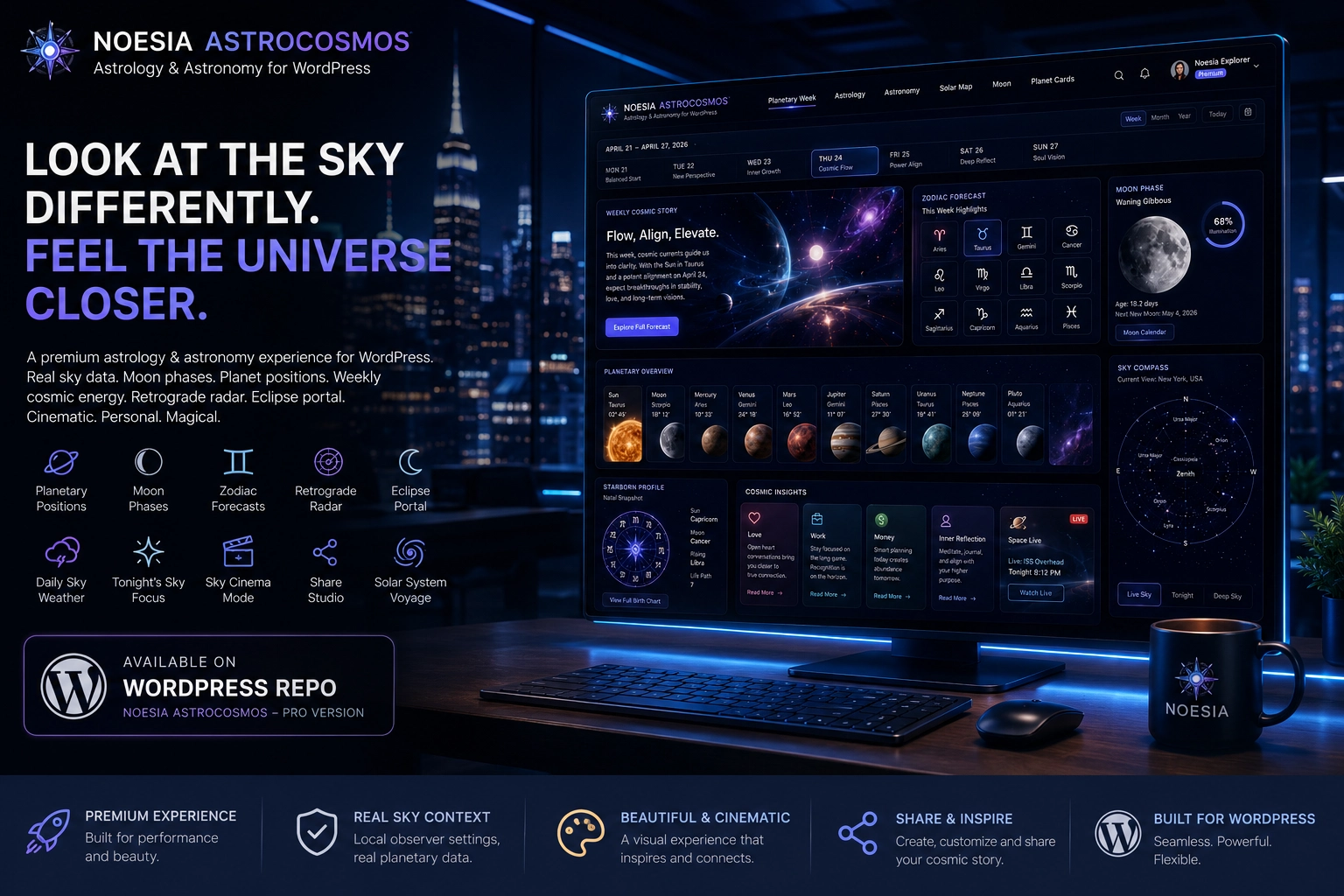
Some apps simply show information. AstroCosmos was built as an atmosphere: a cinematic cosmic space where the user does not only check a horoscope, but feels the Moon phase, the rhythm of the week, the motion of the planets, the mystery of eclipses, and the sense that something greater is moving above us.
It was not created to blindly predict life. It was created to help users observe themselves with more clarity, feel the rhythm of the week, and look at the sky with a completely different sense of wonder.
Some apps simply show information. And then there are experiences that make you stop for a moment, look up, and remember that you live beneath an infinite, living universe.
AstroCosmos, available in the Pro version of Noesia Matrix OS, is one of those experiences. It is not just another astrology app. It is a gateway into a living sky — a digital cosmic space where people do not simply read a forecast, but feel a connection with the Moon, the planets, the zodiac, the rhythm of the week, and the mysterious sense that something greater is moving above us.
Behind the experience, AstroCosmos connects the visual beauty of the sky with real sky context: local observer settings, Moon phases, planetary positions, visible celestial bodies, weekly zodiac energies, and cinematic navigation through the Solar System Voyage. This way, the forecast does not remain disconnected from the sky — it becomes part of a living, visual, and personal journey.
With AstroCosmos, the sky becomes an experience. The user enters to feel, to see the Moon phase, to sense the atmosphere of the day, to discover where the planets are, to follow the Retrograde Radar as a moment of review and reflection, and to explore upcoming eclipses through the Eclipse Portal.
AstroCosmos also includes a complete Share Studio where users can create cosmic posts for eclipses, Moon phases, Retrograde Radar, Daily Sky Weather, Tonight’s Sky Focus, weekly zodiac energies, and personal announcements, with theme selection, custom colors, message, brand name, logo, and their own uploaded image.
This is not just an interface. It is atmosphere. It is mystery. It is inner stillness — and at the same time, a burst of inspiration.
Useful for creators, astrologers, studios, and content brands that want a cinematic, branded sky experience instead of a plain horoscope list.
Useful for hotels, lounges, salons, wellness spaces, and premium venues that want a memorable digital atmosphere for guests and customers.
Useful when the operator wants one more premium Pro application inside the same modular shell, with isolated assets and a high-end visual layer.

Admin path: open the Noesia Smart Waiter admin area and select AstroCosmos from the Pro / Matrix application surface.
Tier: this module is part of the Pro tier.
Role expectation: intended for administrators, creators, operators, astrology brands, hospitality teams, salons, wellness spaces, and anyone who wants a premium cosmic experience inside the platform.
Make sure AstroCosmos is available in the Pro layer and opens correctly from the Noesia Matrix OS shell.
Use the module’s observer and time context so Moon, planet, and sky views feel connected to the selected location and moment.
Confirm that the current language, weekly zodiac content, sky story, and astronomy data packs are loaded as expected.
Add brand name, logo, theme colors, and optional uploaded image before exporting social-ready cosmic PNG cards.
Start from the weekly sky story and sense the atmosphere of the current cycle.
Move into the Moon phase and Tonight’s Sky Focus to understand the current sky mood.
Use planetary positions, sky compass, and solar system views to understand the visible cosmic context.
Use the weekly zodiac layer as guidance and reflection, not as blind life prediction.
Open Share Studio, choose a theme, add message and branding, and export the PNG card.
The home experience: weekly cosmic story, rhythm, mood, and the main emotional gateway into the module.
The Moon-focused surface for phase, mood, and tonight’s sky attention.
The astronomy-facing layer that helps the user understand sky position and observer context.
The cinematic planetary navigation surface designed to make exploration feel visual and alive.
The cycle-awareness screens for reflection, timing, review, and upcoming eclipse moments.
The branded output surface where the sky becomes a personal or business-ready PNG card.
Open the weekly sky story, review zodiac energies, select the strongest current theme, and export a branded card through Share Studio.
Use observer and selected-time context with Moon and planetary positions to understand what is happening in the current sky view.
Open the Moon experience, choose the message, add brand identity, and export a polished PNG for social channels.
Use Eclipse Portal and Retrograde Radar as reflective content pillars, then publish visually consistent cards for your audience.
Issue: Moon or planet context feels disconnected from the user’s expected location or time.
Why it happens: the observation point, selected date, time, or language/data pack may not match the intended test moment.
What to do: recheck observer settings, selected time, and active data pack before assuming the sky layer is wrong.
Issue: some screens feel less vivid than expected.
Why it happens: browser cache, old CSS, or reduced-quality media replacement can make backgrounds appear flat.
What to do: hard refresh, confirm the correct WebP assets are loaded, and verify no optimizer is replacing the images with low-quality versions.
Issue: the exported card differs from the on-screen composition.
Why it happens: uploaded images, fonts, browser canvas limits, or cached assets can affect rendering.
What to do: try again after image load completes, use a balanced image size, and confirm branding inputs are saved before export.
Issue: cinematic backgrounds and visual cards can feel heavier on weaker hardware.
Why it happens: AstroCosmos is visual by design and uses premium imagery, glass panels, and animation.
What to do: keep image assets optimized, avoid unnecessary browser tabs, and use the module on a modern browser for the best experience.
Yes. AstroCosmos is positioned as a premium Pro experience inside Noesia Matrix OS.
No. It combines astrology presentation, astronomy wonder, Moon phases, planetary positions, sky context, and cinematic exploration.
No. The intended framing is reflection, rhythm, observation, and wonder — not deterministic life prediction.
Yes. Moon phase presentation is one of the core emotional and visual parts of the module.
Yes. The experience includes planet and sky-position context based on selected observer and time settings.
It is a cycle-awareness screen designed around review, reflection, and better alignment with the current cosmic rhythm.
It is the AstroCosmos surface for exploring upcoming eclipse moments with a more cinematic and focused presentation.
It is the cinematic exploration layer that turns planetary navigation into a visual journey.
Yes. Share Studio can create branded cosmic cards and export them as PNG images.
Yes. It can support astrology brands, hotels, salons, wellness spaces, creators, and premium digital experiences.
Yes. It is a premium experiential module that expands the Noesia Matrix OS beyond operations into atmosphere and emotional engagement.
The combination of premium visuals, sky context, zodiac energy, Moon and planet surfaces, and branded output makes it feel like a living sky gateway.
The Noesia Matrix is the shared architecture language and module fabric behind Noesia Smart Waiter. This module is not just a static page; it sits inside an isolate-first modular system designed for shell-driven navigation, clean section ownership, extensible widget zones, and future-safe expansion.
The architecture direction is intentionally high-control: modular ownership, isolated assets, lazy-ready behavior, clean settings flow, predictable prefixes, maintainable service boundaries, and enterprise-safe discipline around structure, security, and extensibility. Noesia transcends the definition of a standard WordPress plugin, operating as a robust platform built upon enterprise-grade Service-Oriented Design.
Here is how the core engine is designed to minimize bloat, maximize stability, and keep the experience consistently fast and responsive:
Event-Driven Inversion of Control (IoC): The platform follows an IoC pattern via a decoupled Event Bus. The central core acts as a “Logic-Less Host” (Blind / DUMMY Kernel). It does not tightly bind itself to module internals; modules announce their own presence, capabilities, and state through controlled registration flows.
The Micro-Frontend Paradigm (MFE): The UI is not a giant monolithic block. Each application behaves as an independent Micro-Frontend with its own dynamic assets, specialized logic, and UI contracts.
Strict Asset Isolation & Lazy-Loading: Resource usage stays disciplined. A module’s CSS, JavaScript, and data components are loaded only when the user reaches or interacts with that specific application surface.
Decoupled Registry Pattern: The dynamic discovery layer allows applications to be added or removed quickly without rewriting core logic. If one application encounters an issue, the architecture is designed to contain that impact instead of cascading it across the platform.
Enterprise-Grade Security & Stability: The platform is reinforced with strict input sanitization, dynamic registry routing, and defensive safety gates across the stack. The data layer and the user interface remain deliberately separated for maintainability and risk control.
The Result: A scalable hospitality and clinical operating system engineered to manage mission-critical workflows securely — from intimate cafés to high-traffic venues and sensitive medical environments.
When you open a ticket, include one clean screenshot, the exact visible error text, short reproduction steps, and whether the problem is constant or intermittent. That reduces back-and-forth and speeds up resolution.
Open SupportEnter the application layer: Explore the full Noesia Smart Waiter ecosystem and discover how each isolated module helps serve hospitality, operations, business workflows, and the wider mission to reimagine life through smarter software.
Scroll into the Matrix: The catalog below is the live gateway to the platform. Move through Free and Pro environments, open each documentation page, and step directly into the next application surface.
