Instant attachment
You fall in love with it from the first screen.

Smart Pocket is the premium media and personal vault environment of Noesia Smart Waiter — a beautiful, high-control console where notes, music, music videos, gallery media, voice clips, pinned items, favorites, and world radio live together in one flowing workspace. It is built to become part of everyday life: command your acoustic environment with absolute precision, keep your files and tracks under your own ownership, and enjoy a fast, elegant media system without ads, without third-party clutter, and without handing your library to somebody else.
You fall in love with it from the first screen.
It becomes part of your everyday rhythm.
Your files stay yours, uploaded once and always there.
Bold amplifier-inspired atmosphere with premium control flow.
Extra loudness control when the room needs more energy.
Live motion and color that make playback feel alive.
Shape the sound exactly the way your venue, lounge, or personal space demands.
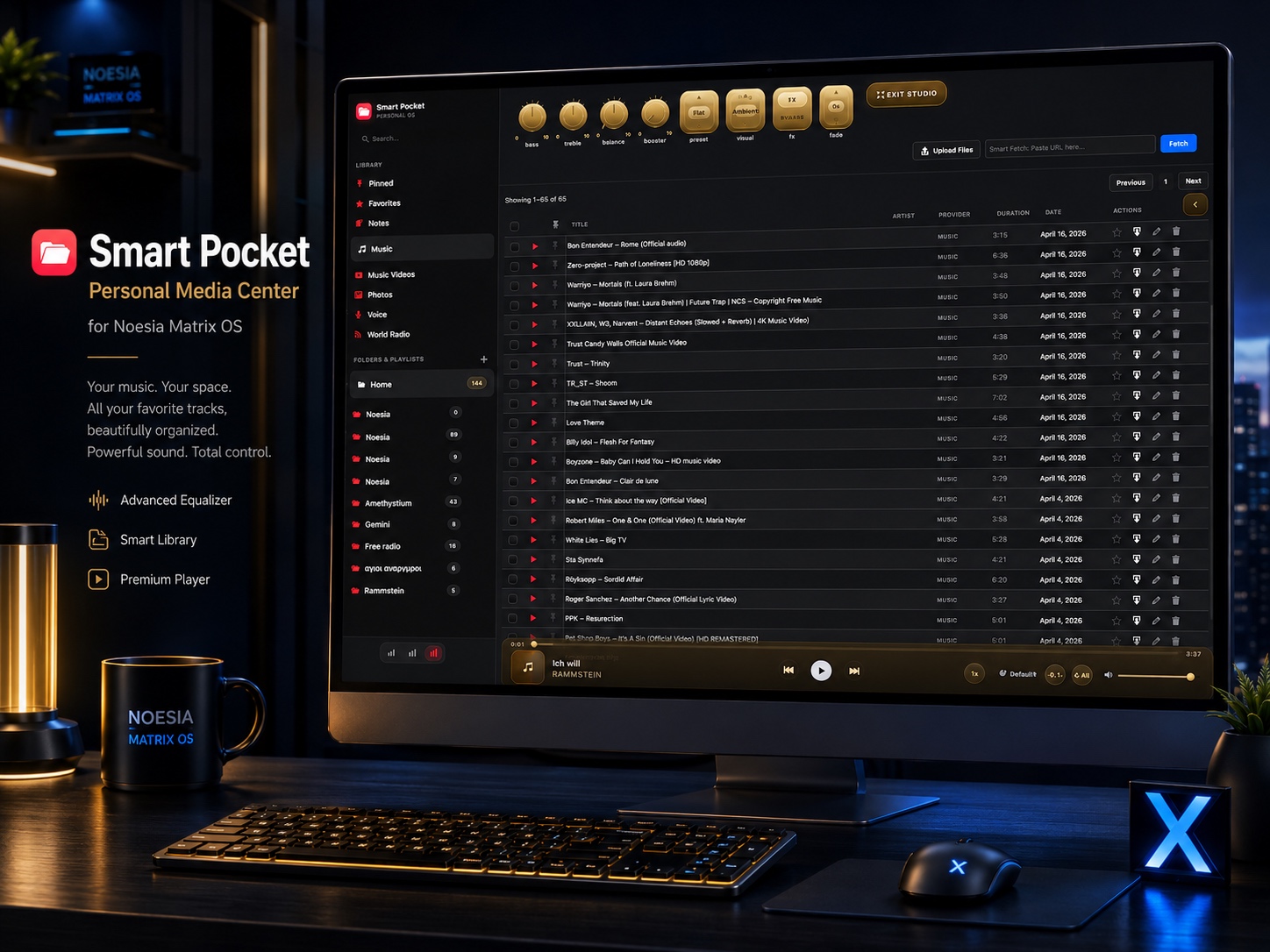
Your personal media center inside the Noesia Matrix OS. Music, voice, images, notes, playlists, music videos, and world radio in one flow.
Perfect when a venue wants one premium music and media console for atmosphere control, radio discovery, curated playlists, branded playback, private uploads, and a more elevated day-to-day sound experience.
Ideal for users who want notes, folders, favorite items, pinned shortcuts, owned tracks, voice clips, videos, and photo media all accessible from one coherent environment instead of scattered apps and subscriptions.
Made for users who want speed, rich interaction, and visual quality without bloated enterprise complexity — just a deeply functional vault that feels cinematic, fast, and genuinely enjoyable to use every day.
Admin path: open the Noesia Smart Waiter admin shell and select Smart Pocket from the module navigation.
Tier: Smart Pocket belongs to the Pro layer.
Role expectation: usually used by owners, managers, creators, media-curating teams, or any user who wants one premium personal vault inside the wider Noesia environment.
Set the basic logic for notes, music, videos, gallery items, and voice clips first. Smart Pocket becomes much stronger when folders and naming stay clean from day one.
Large media libraries depend not only on Smart Pocket caps but also on your PHP and hosting limits. Review server values shown in the upload panel before moving large batches.
Test the sound knobs, presets, visualizer modes, repeat logic, crossfade timing, and surface tones so the player feels right for your room, venue, or personal habit.
The vault becomes dramatically more powerful when the items you open most often are promoted into Favorites and Pinned instead of being buried in larger lists.
Create the core folder structure first, especially if Smart Pocket will become part of your everyday planning, memory, and curation routine.
Add music, gallery items, voice files, and videos through the queue uploader, watch the progress bars, and use retry only where needed instead of repeating successful files.
Choose the preset that matches the room, fine-tune bass / treble / balance / booster, then activate the visualizer mode and player tone that fit your mood or venue identity.
Promote favorite tracks, radio stations, notes, or special references into Pinned and Favorites so the vault feels personal, fast, and instantly useful.
Once organized, Smart Pocket becomes a daily environment: one place for memory, owned media, playback, atmosphere, and fast access without depending on fragmented services.
The left navigation is where the vault identity begins: Pinned, Favorites, Notes, Music, Music Videos, Gallery, Voice, and World Radio are all available through one beautiful left-column control surface.
This area gives the vault its real structure. It is what turns Smart Pocket from a loose media bin into a place that feels curated, flexible, and personally meaningful.
The three-icon width control lets the user shift the left column between compact, default, and wide behavior depending on how much navigation detail is needed.
When working with music or gallery uploads, Smart Pocket can shift into a split layout where the main canvas and the upload side panel stay readable at the same time.
This is the command center for preset selection, visualizer behavior, volume, repeat logic, crossfade feel, and the overall acoustic personality of the vault.
The visualizer area is not cosmetic filler. It gives Smart Pocket a live, reactive, premium feel and helps the player read like a true media console.
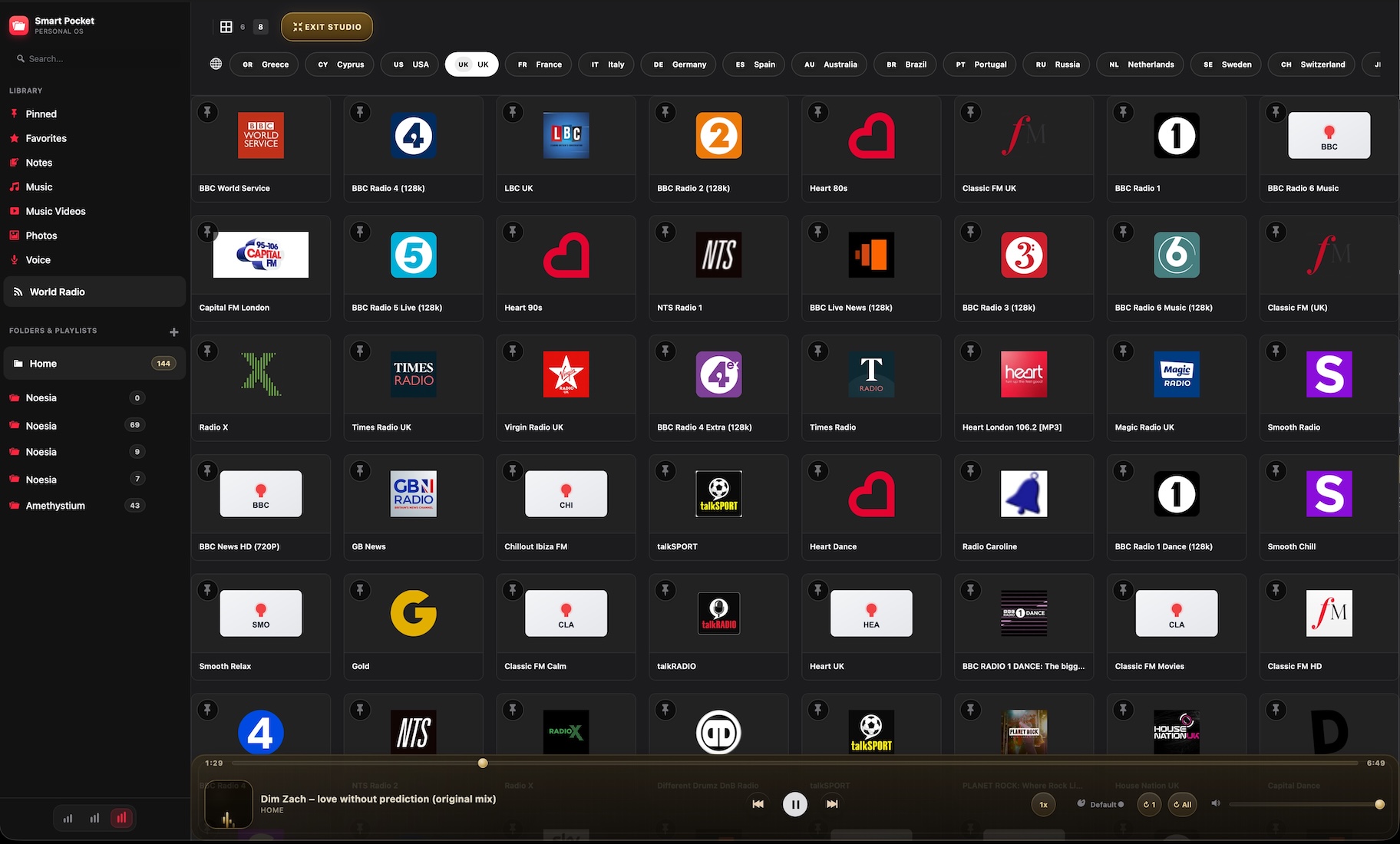
The World Radio area includes fast country switching and makes discovery immediate, without forcing the user into a hidden search maze.
The upload panel surfaces queue summary, per-file outcomes, and server constraints so the user can understand exactly why a media batch succeeded, paused, or failed.
Upload owned tracks, shape the player with presets and booster, pin the essential playlists, and keep world radio available as a second layer for atmosphere control during different hours of the day.
Use notes and folders for daily memory, keep favorite tracks and important media pinned, and turn Smart Pocket into one personal command environment that feels more intimate and more useful than a pile of disconnected apps.
Add up to 30 files to the queue, let up to 3 run in parallel, watch per-file status, then retry only the failed subset if the server environment or file size conditions require another pass.
Switch countries, browse the top station list, play instantly, and pin the stations that deserve permanent space inside the vault so they stay available next to your owned library.
Register important remote video links into the vault so references, playlists, and media inspiration remain part of one coherent environment rather than disappearing across tabs and bookmarks.
Issue: files do not complete successfully or only part of the batch finishes.
Why it happens: Smart Pocket enforces file caps and queue limits, but server-side limits such as post_max_size, upload_max_filesize, max_file_uploads, memory_limit, or max_input_time may still block the batch.
What to do: check the upload diagnostics panel first, compare the current file type against its Smart Pocket cap, and retry only the failed files once the environment is understood.
Issue: not every selected file enters the batch.
Why it happens: the uploader is intentionally bounded; the queue accepts up to 30 files in one batch and then stops extra items from entering silently.
What to do: split larger imports into multiple clean batches instead of trying to push everything at once.
Issue: playback works, but the room or headphones sound unbalanced.
Why it happens: the current preset, bass, treble, balance, booster, or player tone may not match the acoustic environment.
What to do: start from Flat, then adjust one control at a time and re-check the room before assuming the file itself is the problem.
Issue: the radio surface loads, but the station list is empty or inconsistent.
Why it happens: radio discovery depends on live remote station lookup per selected country, so availability can vary by country, station, and current network conditions.
What to do: switch country, refresh the current view, and test with another country before treating it as a permanent failure.
Issue: the shortcut surfaces feel empty even though the library is populated.
Why it happens: Favorites and Pinned are deliberate surfaces; they only become powerful once the user actively promotes important items into them.
What to do: curate the vault intentionally. Smart Pocket becomes dramatically more elegant once your top items are explicitly pinned or favorited.
Issue: navigation feels cramped or wastes space.
Why it happens: the current sidebar width preset does not match your working style or current screen size.
What to do: use the three width controls to switch between compact, default, and wide until the vault matches your preferred rhythm.
Issue: a big library starts to feel hard to scan.
Why it happens: large music collections naturally demand more structure and better grouping.
What to do: use folders, favorites, pinned surfaces, and the 100-item page rhythm intentionally instead of trying to keep the whole collection as one flat wall.
Issue: a fetched or registered remote video entry does not look as rich as expected.
Why it happens: preview richness depends on provider data, remote metadata availability, and the exact shape of the original link.
What to do: test with the clean provider URL first and verify that the source link is valid before assuming the vault failed.
Yes. Smart Pocket belongs to the Pro layer.
Yes. Notes, music, videos, gallery items, voice media, favorites, pinned items, and radio all live in the same vault environment.
Music and video support 100 MB per file, voice supports 50 MB, and gallery items support 20 MB per file.
The batch uploader is designed for up to 30 files per batch with up to 3 parallel uploads.
Yes. Failed uploads can be retried without rebuilding the entire batch from zero.
Yes. Smart Pocket includes a country-based World Radio surface and lets users browse and play top stations by selected country.
Yes. Important stations can be brought back into the vault through the pinned logic.
Bass, treble, balance, booster, preset selection, repeat logic, visualizer mode, crossfade timing, and player tone control are all part of the experience.
Flat, Warm, Voice, Bass Boost, and Night.
Off, Aura, Ring, Ambient, Magic, Mono, and Full.
Yes. Compact, default, and wide sidebar modes are built in.
No. It is designed as a controlled vault experience around your own organization, your own uploads, and your own preferred workflow.
The Noesia Matrix is the shared architecture language and module fabric behind Noesia Smart Waiter. This module is not just a static page; it sits inside an isolate-first modular system designed for shell-driven navigation, clean section ownership, extensible widget zones, and future-safe expansion.
The architecture direction is intentionally high-control: modular ownership, isolated assets, lazy-ready behavior, clean settings flow, predictable prefixes, maintainable service boundaries, and enterprise-safe discipline around structure, security, and extensibility. Noesia transcends the definition of a standard WordPress plugin, operating as a robust platform built upon enterprise-grade Service-Oriented Design.
Here is how the core engine is designed to minimize bloat, maximize stability, and keep the experience consistently fast and responsive:
Event-Driven Inversion of Control (IoC): The platform follows an IoC pattern via a decoupled Event Bus. The central core acts as a “Logic-Less Host” (Blind / DUMMY Kernel). It does not tightly bind itself to module internals; modules announce their own presence, capabilities, and state through controlled registration flows.
The Micro-Frontend Paradigm (MFE): The UI is not a giant monolithic block. Each application behaves as an independent Micro-Frontend with its own dynamic assets, specialized logic, and UI contracts.
Strict Asset Isolation & Lazy-Loading: Resource usage stays disciplined. A module’s CSS, JavaScript, and data components are loaded only when the user reaches or interacts with that specific application surface.
Decoupled Registry Pattern: The dynamic discovery layer allows applications to be added or removed quickly without rewriting core logic. If one application encounters an issue, the architecture is designed to contain that impact instead of cascading it across the platform.
Enterprise-Grade Security & Stability: The platform is reinforced with strict input sanitization, dynamic registry routing, and defensive safety gates across the stack. The data layer and the user interface remain deliberately separated for maintainability and risk control.
The Result: A scalable hospitality and clinical operating system engineered to manage mission-critical workflows securely — from intimate cafés to high-traffic venues and sensitive medical environments.
When you open a ticket, include one clean screenshot, the exact visible error text or wrong state, short reproduction steps, and whether the problem happens always or only under certain media, server, or browser conditions.
Open SupportEnter the application layer: Explore the full Noesia Smart Waiter ecosystem and discover how each isolated module helps serve hospitality, operations, business workflows, and the wider mission to reimagine life through smarter software.
Scroll into the Matrix: The catalog below is the live gateway to the platform. Move through Free and Pro environments, open each documentation page, and step directly into the next application surface.