Administrators
Useful for quick checks, formatting help, JSON review, provider inspection, and small operational diagnostics that would otherwise require external tools.

Widgets is the compact diagnostics and live helper surface of Noesia Smart Waiter. It brings together small but useful tools such as JSON inspection, hash generation, color and contrast helpers, provider or endpoint checks, and quick network-oriented mini diagnostics. Instead of forcing the operator to leave the platform for micro-tasks, Widgets keeps these utility actions inside the Noesia shell where they can be used instantly.
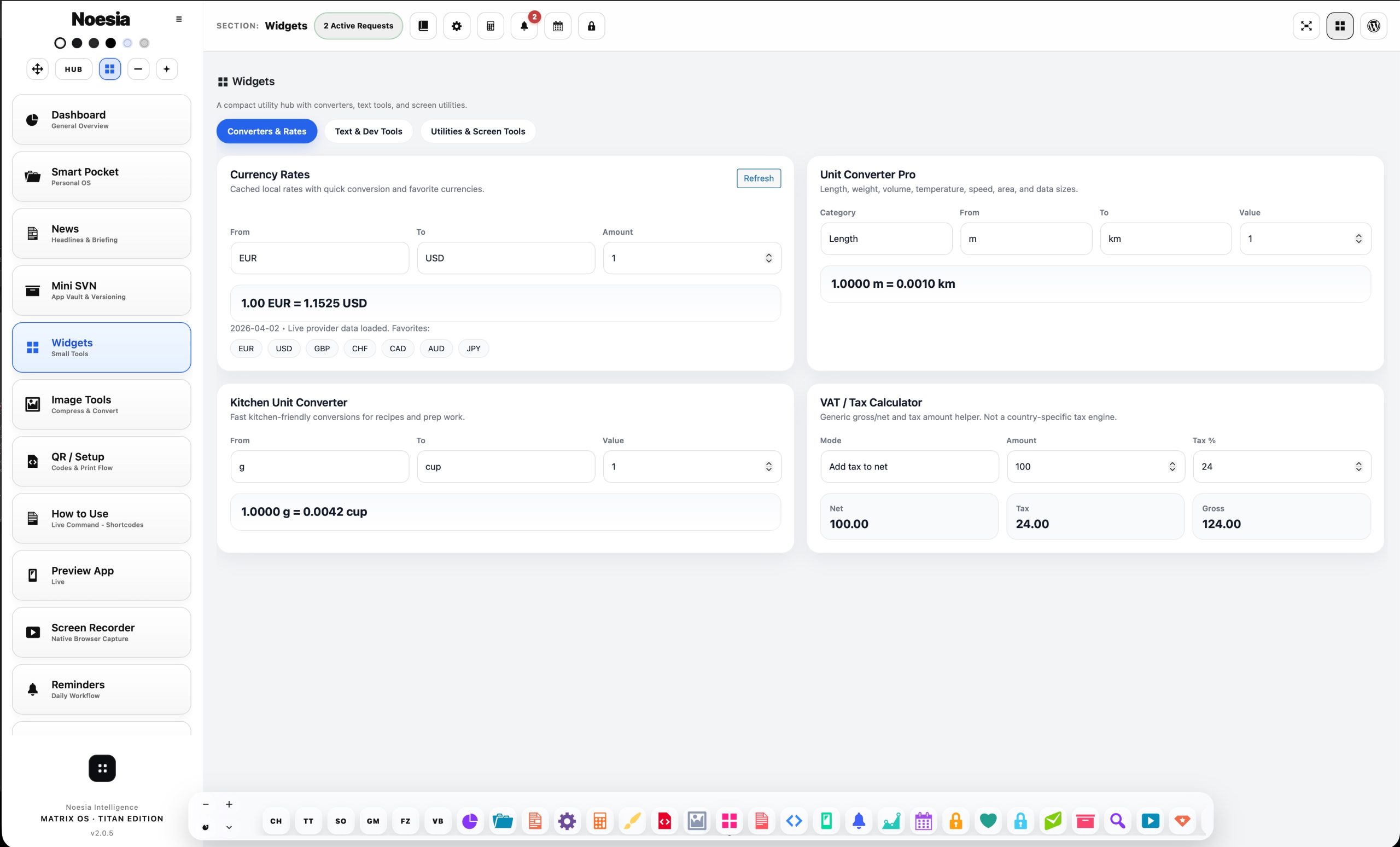
Useful for quick checks, formatting help, JSON review, provider inspection, and small operational diagnostics that would otherwise require external tools.
Useful when the installation needs immediate micro-debugging, rapid validation, or helper actions during setup and maintenance work.
Useful for fast technical-adjacent tasks that should stay accessible inside Noesia instead of becoming separate browser tabs and fragmented workflow.
Admin path: open the Noesia Smart Waiter admin area and select Widgets from the plugin shell navigation.
Tier: this module is part of the Free tier.
Role expectation: intended mainly for administrators, power users, testers, and advanced operators who need compact helper tools inside the main shell.
The module is strongest when used for quick helper actions and fast validation, not as a replacement for deeper systems.
If the team keeps opening separate tabs for JSON, hashes, color checks, or provider sanity checks, Widgets is the right internal home for those actions.
Widgets is valuable because it is immediate, not because it tries to become a large standalone application.
The module becomes more valuable the more it keeps technical-adjacent helper actions inside the Noesia environment.
Use it instead of leaving the Noesia shell for a separate utility site or random external tool.
Choose the JSON, hash, color, provider, or diagnostic helper that matches the immediate task.
Use Widgets for speed and validation, especially during setup, troubleshooting, or admin tuning.
The real strength is that the operator stays inside the same platform and can continue working immediately after the helper task is finished.
Widgets becomes more valuable over time as the team builds a habit of using it for all small technical-adjacent checks.
This matters because structured data inspection is one of the fastest ways to validate configuration or API-style behavior.
This matters because many micro tasks are repetitive and should not require external utility pages.
This matters because visual helper checks are often needed during admin or UI tuning work.
This matters because operators often need lightweight reassurance that a configured provider or route is responding as expected.
The module is useful because many small helpers are available together in one place instead of being fragmented across many tools.
Widgets matters because it prevents unnecessary context switching during setup, checking, and support work.
Use Widgets to inspect or validate structured content without leaving the Noesia workspace for a separate formatter or checker.
Use the module to perform fast helper-level validation before escalating to deeper debugging or support.
Use Widgets during UI tuning work when quick visual validation is needed inside the same shell.
Instead of opening random third-party utilities, the operator handles the small task directly inside Noesia and returns to work immediately.
Issue: the user opens Widgets and is unsure why it exists.
Why it happens: Widgets is not a broad business module; it is a focused helper surface for repeated micro-tasks and diagnostics.
What to do: use it specifically for quick checks, validation, and helper actions rather than expecting it to behave like a large workflow application.
Issue: the module exists but people keep opening outside utility sites.
Why it happens: they have not yet built the habit of using the internal helper toolbox.
What to do: start with the most frequent repetitive tasks and move those into Widgets first.
Issue: the result is not as informative as the user expected.
Why it happens: Widgets is meant for lightweight helper validation, not for full enterprise observability.
What to do: use it for fast sanity checks first, then escalate into deeper debugging only if the lightweight result suggests a real problem.
Issue: the user assumes it is unimportant because it is compact.
Why it happens: small tools often hide value when they reduce repeated context switching and support noise.
What to do: judge the module by how often it saves time during real admin and support work, not by how large it looks.
Yes. It belongs to the free tier and acts as the compact diagnostics and helper-tools surface of the platform.
To keep small but useful helper actions such as JSON checks, hash tools, color utilities, and provider sanity checks inside the Noesia shell.
Usually it is more useful for admins, testers, power users, and advanced operators.
No. It handles fast lightweight helper tasks and micro-diagnostics, not deep enterprise debugging.
Because reducing context switching saves time and helps the operator stay inside the same workflow.
Yes. Those are some of the most practical use cases.
Yes. It helps with quick visual helper checks during admin or UI tuning tasks.
Yes. That is the right mental model.
Because it solves many repeated micro-tasks that otherwise waste time and fragment attention.
Yes. It is exactly the kind of small but high-frequency helper module that benefits from staying integrated.
Yes, especially for fast pre-checks before deeper escalation.
Yes. Speed and convenience are central to its value.
The Noesia Matrix is the shared architecture language and module fabric behind Noesia Smart Waiter. This module is not just a static page; it sits inside an isolate-first modular system designed for shell-driven navigation, clean section ownership, extensible widget zones, and future-safe expansion.
The architecture direction is intentionally high-control: modular ownership, isolated assets, lazy-ready behavior, clean settings flow, predictable prefixes, maintainable service boundaries, and enterprise-safe discipline around structure, security, and extensibility. Noesia transcends the definition of a standard WordPress plugin, operating as a robust platform built upon enterprise-grade Service-Oriented Design.
Here is how the core engine is designed to minimize bloat, maximize stability, and keep the experience consistently fast and responsive:
Event-Driven Inversion of Control (IoC): The platform follows an IoC pattern via a decoupled Event Bus. The central core acts as a “Logic-Less Host” (Blind / DUMMY Kernel). It does not tightly bind itself to module internals; modules announce their own presence, capabilities, and state through controlled registration flows.
The Micro-Frontend Paradigm (MFE): The UI is not a giant monolithic block. Each application behaves as an independent Micro-Frontend with its own dynamic assets, specialized logic, and UI contracts.
Strict Asset Isolation & Lazy-Loading: Resource usage stays disciplined. A module’s CSS, JavaScript, and data components are loaded only when the user reaches or interacts with that specific application surface.
Decoupled Registry Pattern: The dynamic discovery layer allows applications to be added or removed quickly without rewriting core logic. If one application encounters an issue, the architecture is designed to contain that impact instead of cascading it across the platform.
Enterprise-Grade Security & Stability: The platform is reinforced with strict input sanitization, dynamic registry routing, and defensive safety gates across the stack. The data layer and the user interface remain deliberately separated for maintainability and risk control.
The Result: A scalable hospitality and clinical operating system engineered to manage mission-critical workflows securely — from intimate cafés to high-traffic venues and sensitive medical environments.
When you open a ticket, include one clean screenshot, the exact visible error text, short reproduction steps, and the exact helper tool that failed. That reduces back-and-forth and speeds up resolution.
Open SupportEnter the application layer: Explore the full Noesia Smart Waiter ecosystem and discover how each isolated module helps serve hospitality, operations, business workflows, and the wider mission to reimagine life through smarter software.
Scroll into the Matrix: The catalog below is the live gateway to the platform. Move through Free and Pro environments, open each documentation page, and step directly into the next application surface.
