Cafés, restaurants, and bars
Useful when every table needs a ready QR that opens the Smart Waiter experience, the menu, or a direct communication path with the venue.

QR Menu / QR Setup gives the business a fully usable Generate & Print QR Codes surface with effectively unlimited QR creation for general use and for Smart Waiter deployment with one click. It exists so the owner or admin can create table QR codes, print them in batches, attach them to stands, walls, cashier points, or tables, and instantly connect customers to the live command experience, the menu flow, or any other public destination the business wants to expose.
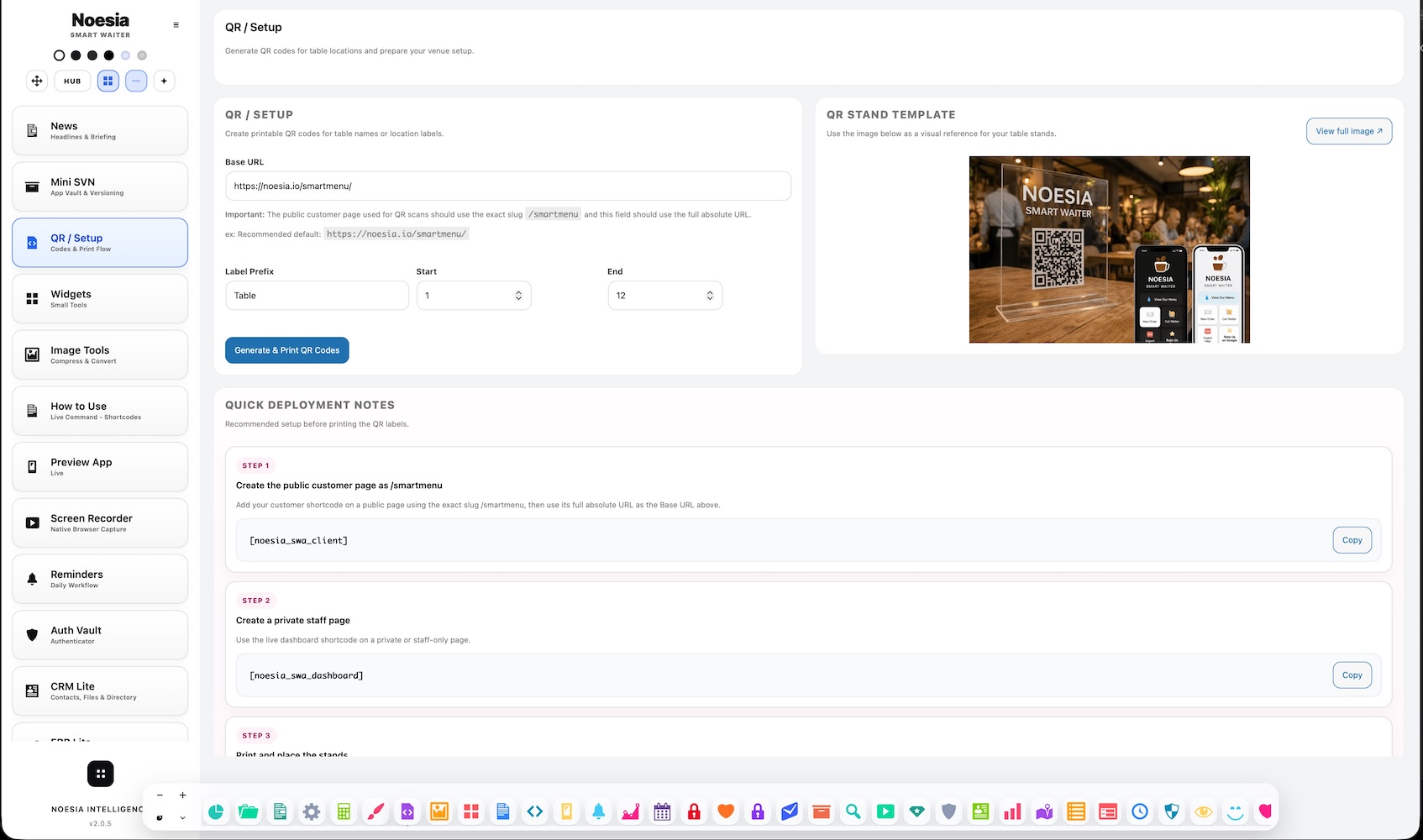
Useful when every table needs a ready QR that opens the Smart Waiter experience, the menu, or a direct communication path with the venue.
Useful when QR entry points need to be placed in rooms, stands, counters, or hospitality zones so guests can reach service fast.
Useful when the admin wants one place to generate, print, test, and deploy unlimited QR codes without needing extra tools or paid QR services.
[noesia_swa_client].[noesia_swa_dashboard].Admin path: open the Noesia Smart Waiter admin area and select QR Menu / QR Setup from the plugin shell navigation.
Tier: this module is part of the Free tier.
Role expectation: intended for administrators, managers, and venue operators who need to generate and deploy physical QR access points.
Before printing anything, make sure the Smart Waiter public page or menu destination is already working so the QR points somewhere real.
Choose whether the QR will be used alone on paper / sticker media, inside printed table stands, at the cashier, or next to a screen already showing the live command interface.
Use QR Setup to create the exact number of QR entry points needed for the venue, whether that means tables, counters, rooms, or service points.
Always scan several codes after printing to confirm they open the expected live command or menu destination correctly on real phones.
Enter the module when you are ready to create physical QR access points for customers.
Decide whether the QR should open the menu, the live command customer page, or another public business destination.
Create one QR or many QR codes for tables, zones, rooms, or any location pattern the business needs.
Use stands, cashier placement, wall placement, table cards, or other physical points where customers can instantly scan and enter.
Scan the QR with a real phone, make sure the customer can reach the venue, and confirm that live command communication works as expected.
This is the core area where the admin creates QR codes for one or many business use cases.
This matters because QR deployment is not complete until the generated codes can be turned into real printed customer entry points.
The module is useful because it connects QR creation to real Smart Waiter entry points, not just to decorative codes.
In practical setups, the customer page typically uses [noesia_swa_client], while the admin-side monitoring commonly uses [noesia_swa_dashboard].
The business can deploy QR codes as standalone printed items or as part of richer table / screen experiences.
Every QR is ultimately useful because it becomes a direct communication doorway between customer and venue.
Generate a full table QR set, print them, place them on stands or table cards, and let customers enter the live command experience with one scan.
Place QR codes at the cashier or service counter so visitors can immediately access menu, service, or communication flows.
Use the QR codes alone as printed stickers or wall-mounted entry points when the business wants a low-cost deployment style.
Some venues may keep a screen already showing live command or menu content at the table and still add a QR next to it for direct personal-phone access.
Issue: the customer reaches the wrong destination after scanning.
Why it happens: the QR was generated from an old or incorrect public URL, or the destination logic changed after the code was printed.
What to do: verify the public destination first, then regenerate and reprint the affected QR set.
Issue: customers struggle to scan the printed code.
Why it happens: print quality, size, material, or placement is poor even if the underlying QR is valid.
What to do: print at a clearer size, test on real phones, and avoid glossy or awkward placement angles where possible.
Issue: the QR works, but the customer-facing page still looks incomplete.
Why it happens: design, menu, or live command settings may not have been finalized before QR deployment started.
What to do: finish the public-facing configuration first, then retest and redeploy the QR set.
Issue: the public page works, but the operator is unsure how shortcode-based entry connects to QR usage.
Why it happens: the shortcode page and the QR deployment page were not mentally tied together during setup.
What to do: treat the public shortcode page as the destination, and treat the QR code as the physical doorway that sends the customer there.
Yes. It belongs to the free tier and includes unlimited QR generation and print workflows.
Yes. The module is intended to give the business effectively unlimited QR generation for many use cases, including Smart Waiter rollout.
No. They can also be used for other general business destinations, but Smart Waiter is one of the strongest one-click use cases.
Yes. Batch and table-range style generation is one of the practical strengths of the module.
In typical Smart Waiter setups, the guest-facing public experience is attached to [noesia_swa_client], while the admin-side monitoring commonly uses [noesia_swa_dashboard].
Yes. Stands are one of the most common deployment methods.
Yes. QR codes can be used on walls, at service counters, at the cashier, on tables, or in other visible guest entry points.
Yes. Some venues use both: a screen already showing the live command experience and a QR next to it for direct phone access.
No. QR codes can be used alone as printed items or stickers if the business prefers a lower-cost deployment style.
Because a valid QR still needs good physical size, print quality, and placement to work well in real customer conditions.
Yes. Its strongest role is turning physical QR placement into a direct communication gateway between guest and venue.
It is operational. The module matters because it connects physical deployment, live command entry, and real venue communication.
The Noesia Matrix is the shared architecture language and module fabric behind Noesia Smart Waiter. This module is not just a static page; it sits inside an isolate-first modular system designed for shell-driven navigation, clean section ownership, extensible widget zones, and future-safe expansion.
The architecture direction is intentionally high-control: modular ownership, isolated assets, lazy-ready behavior, clean settings flow, predictable prefixes, maintainable service boundaries, and enterprise-safe discipline around structure, security, and extensibility. Noesia transcends the definition of a standard WordPress plugin, operating as a robust platform built upon enterprise-grade Service-Oriented Design.
Here is how the core engine is designed to minimize bloat, maximize stability, and keep the experience consistently fast and responsive:
Event-Driven Inversion of Control (IoC): The platform follows an IoC pattern via a decoupled Event Bus. The central core acts as a “Logic-Less Host” (Blind / DUMMY Kernel). It does not tightly bind itself to module internals; modules announce their own presence, capabilities, and state through controlled registration flows.
The Micro-Frontend Paradigm (MFE): The UI is not a giant monolithic block. Each application behaves as an independent Micro-Frontend with its own dynamic assets, specialized logic, and UI contracts.
Strict Asset Isolation & Lazy-Loading: Resource usage stays disciplined. A module’s CSS, JavaScript, and data components are loaded only when the user reaches or interacts with that specific application surface.
Decoupled Registry Pattern: The dynamic discovery layer allows applications to be added or removed quickly without rewriting core logic. If one application encounters an issue, the architecture is designed to contain that impact instead of cascading it across the platform.
Enterprise-Grade Security & Stability: The platform is reinforced with strict input sanitization, dynamic registry routing, and defensive safety gates across the stack. The data layer and the user interface remain deliberately separated for maintainability and risk control.
The Result: A scalable hospitality and clinical operating system engineered to manage mission-critical workflows securely — from intimate cafés to high-traffic venues and sensitive medical environments.
When you open a ticket, include one clean screenshot, the exact visible error text, short reproduction steps, and whether the problem is constant or intermittent. That reduces back-and-forth and speeds up resolution.
Open SupportEnter the application layer: Explore the full Noesia Smart Waiter ecosystem and discover how each isolated module helps serve hospitality, operations, business workflows, and the wider mission to reimagine life through smarter software.
Scroll into the Matrix: The catalog below is the live gateway to the platform. Move through Free and Pro environments, open each documentation page, and step directly into the next application surface.
