Business owners and administrators
Useful for seeing exactly how the customer-facing mobile experience looks before handing it to real guests, and for keeping control over how the live command flow behaves.

Preview Mode is the administrator-controlled simulation and test surface of Noesia Smart Waiter. It exists so the business owner or administrator can see exactly how the live customer experience looks on mobile, how the beautiful business menu feels in practice, and how the staff side receives or reacts to commands. It is not only a visual showcase: it is also a controlled test space where the admin can send commands, validate flows, and confirm that both free and pro live command experiences behave the way the business expects.
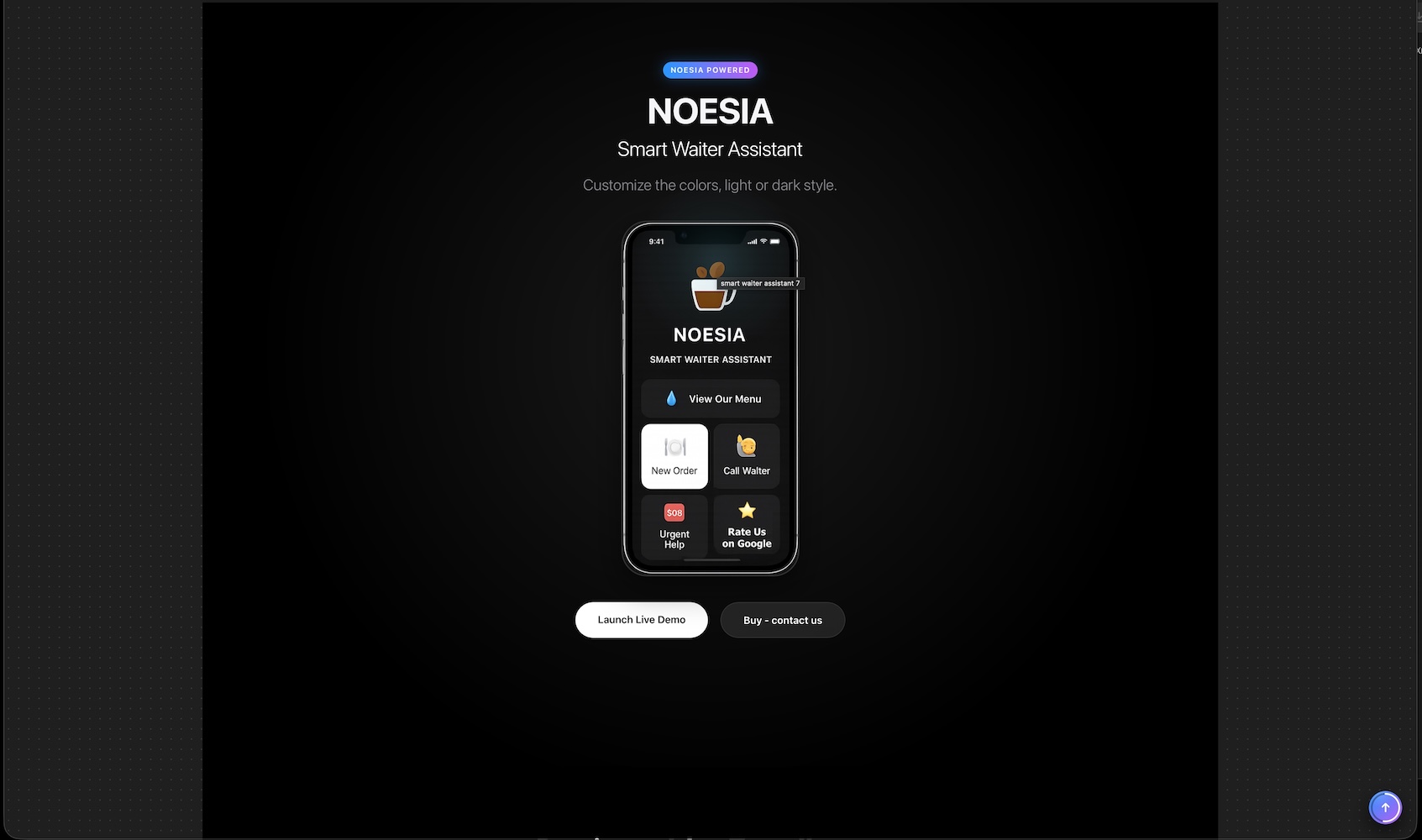
Useful for seeing exactly how the customer-facing mobile experience looks before handing it to real guests, and for keeping control over how the live command flow behaves.
Useful when the team needs to test the customer menu, send commands through the preview, and verify that the system reacts correctly before a venue starts using it live.
Useful when you want to show both sides of the experience: what the customer sees on mobile and what the staff receives as operational input.
Admin path: open the Noesia Smart Waiter admin area and select Preview Mode from the plugin shell navigation.
Tier: this module is useful in both Free and Pro environments as a preview and test surface.
Role expectation: intended primarily for administrators, owners, managers, and testers who need to validate the live command experience before real usage.
Preview Mode becomes much more useful after the public-facing design, labels, and menu content are already configured so the admin is previewing something real.
Before relying on tests, make sure the environment is ready to respond to actions so the preview reflects a real flow instead of a dead surface.
Use the module intentionally: customer beauty check, menu review, action testing, staff reception check, or end-to-end preview of the experience.
Preview Mode should be part of quality control whenever the venue changes menu design, wording, layout, or live command behavior.
Enter the module when you want to inspect the live customer-side appearance or run a control test before real usage.
Look at how the guest-facing menu and action surface actually appears on a phone-style preview.
Use the preview actively to validate buttons, menu flow, and command behavior instead of treating it as a static mockup.
Check how the staff side receives or interprets the action so the manager knows the system is ready for real service.
Return to Preview Mode after updates, menu edits, or design changes to confirm that the experience still behaves the way the business expects.
This is the visual surface that lets the admin see how the guest-side experience looks on a mobile-style screen before real customers use it.
The module lets the business owner inspect the look and feel of the business menu inside a live-feeling presentation context.
This area matters because Preview Mode is not only about seeing, but also about triggering controlled test actions.
The admin can use the preview logic to understand what the staff side receives when the guest initiates a command.
Everything is meant to stay under admin control so the preview is safe, intentional, and useful for real checking rather than random experimentation.
The module is useful whether the installation is operating in the free layer or in a deeper pro-enabled environment.
Use the preview to see the guest-facing menu the way a real customer would experience it and confirm that the business presentation feels beautiful and clear.
Send a command through the preview and confirm that the expected flow reaches the staff side correctly before the venue goes live.
Show the guest-facing mobile view and explain what the staff receives so everyone understands the operational chain end to end.
Return to Preview Mode whenever menu, layout, wording, or action logic changes so the business can validate the full experience again.
Issue: the admin sees a preview that feels out of sync with the expected live result.
Why it happens: design settings, menu content, or action labels may have changed without the preview being rechecked after the latest edits.
What to do: re-save the relevant design and menu settings, then reopen Preview Mode and validate the flow again.
Issue: the admin interacts with the preview, but nothing meaningful appears on the receiving side.
Why it happens: the live command path may not be active, or the test environment is not currently wired to behave like the real venue flow.
What to do: confirm the live command environment is active and that the receiving side is actually ready to listen to the test.
Issue: the preview quality drops after new edits.
Why it happens: new menu or design changes may have shifted labels, visibility, or the visual hierarchy of the guest screen.
What to do: treat Preview Mode as a QA checkpoint after each change, not only as a one-time launch tool.
Issue: the team looks at it but does not use it for real validation.
Why it happens: they may not realize that commands can be tested and operational flow can be checked inside the same module.
What to do: position the module clearly as both a visual preview and a practical live-command testing surface under admin control.
It exists so the admin can see, control, and test how the live customer and staff experience behaves before relying on it in real operation.
Yes. That is one of the core reasons the module exists.
Yes. The module is designed so the business owner can inspect the guest-facing menu experience directly inside the preview context.
Yes. The module is useful not only for viewing but also for controlled testing and command validation.
Yes. It helps the admin understand how the staff side reacts when the customer triggers an action.
No. The preview concept is useful in both free and pro environments.
No. The best use is before launch and after every meaningful design, menu, or action-flow change.
No. It is meant to support real checking, interaction, and operational validation under admin control.
Yes. It is helpful when showing both the customer side and the staff side during onboarding or quality review.
Because it lets the business validate the actual feel and behavior of the experience before real customers start using it.
Yes. That is one of its strongest roles inside the platform.
Yes. It is a classic example of a shell-controlled isolated surface built for clarity, control, and safe validation.
The Noesia Matrix is the shared architecture language and module fabric behind Noesia Smart Waiter. This module is not just a static page; it sits inside an isolate-first modular system designed for shell-driven navigation, clean section ownership, extensible widget zones, and future-safe expansion.
The architecture direction is intentionally high-control: modular ownership, isolated assets, lazy-ready behavior, clean settings flow, predictable prefixes, maintainable service boundaries, and enterprise-safe discipline around structure, security, and extensibility. Noesia transcends the definition of a standard WordPress plugin, operating as a robust platform built upon enterprise-grade Service-Oriented Design.
Here is how the core engine is designed to minimize bloat, maximize stability, and keep the experience consistently fast and responsive:
Event-Driven Inversion of Control (IoC): The platform follows an IoC pattern via a decoupled Event Bus. The central core acts as a “Logic-Less Host” (Blind / DUMMY Kernel). It does not tightly bind itself to module internals; modules announce their own presence, capabilities, and state through controlled registration flows.
The Micro-Frontend Paradigm (MFE): The UI is not a giant monolithic block. Each application behaves as an independent Micro-Frontend with its own dynamic assets, specialized logic, and UI contracts.
Strict Asset Isolation & Lazy-Loading: Resource usage stays disciplined. A module’s CSS, JavaScript, and data components are loaded only when the user reaches or interacts with that specific application surface.
Decoupled Registry Pattern: The dynamic discovery layer allows applications to be added or removed quickly without rewriting core logic. If one application encounters an issue, the architecture is designed to contain that impact instead of cascading it across the platform.
Enterprise-Grade Security & Stability: The platform is reinforced with strict input sanitization, dynamic registry routing, and defensive safety gates across the stack. The data layer and the user interface remain deliberately separated for maintainability and risk control.
The Result: A scalable hospitality and clinical operating system engineered to manage mission-critical workflows securely — from intimate cafés to high-traffic venues and sensitive medical environments.
When you open a ticket, include one clean screenshot, the exact visible error text, short reproduction steps, and whether the problem is constant or intermittent. That reduces back-and-forth and speeds up resolution.
Open SupportEnter the application layer: Explore the full Noesia Smart Waiter ecosystem and discover how each isolated module helps serve hospitality, operations, business workflows, and the wider mission to reimagine life through smarter software.
Scroll into the Matrix: The catalog below is the live gateway to the platform. Move through Free and Pro environments, open each documentation page, and step directly into the next application surface.
