Managers and supervisors
Useful when leadership wants one practical place to assign work, watch progress, spot delays, and keep daily execution under control without opening multiple external tools.

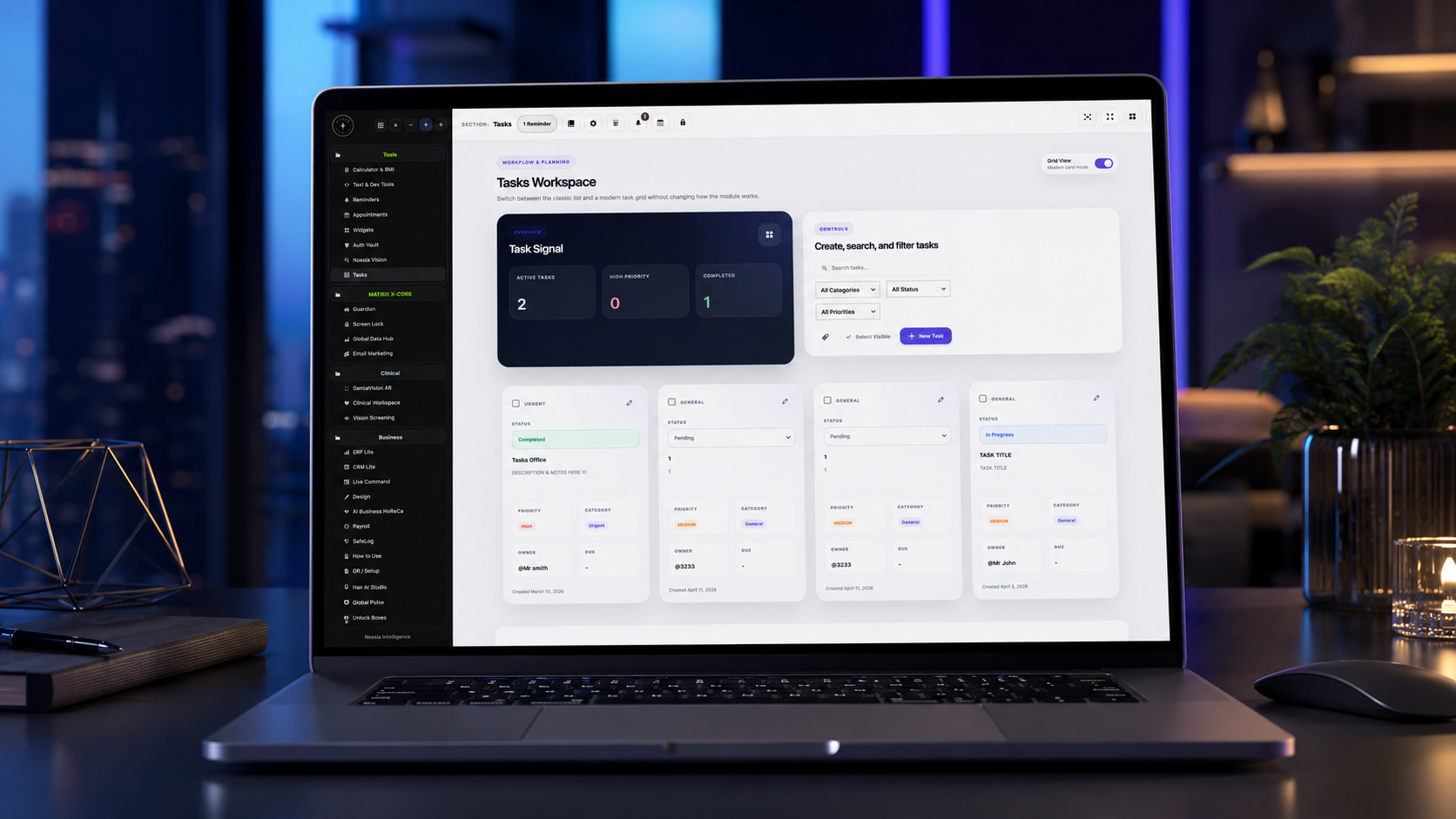
Tasks is the completion-focused execution surface of Noesia Smart Waiter. It gives teams a clean operational space for categories, progress states, ownership clarity, priority handling, due-date discipline, and workload visibility without burying the user under endless enterprise complexity. The module is built to keep daily execution practical, visual, and accountable.
Useful when leadership wants one practical place to assign work, watch progress, spot delays, and keep daily execution under control without opening multiple external tools.
Useful for people who need clarity over what is pending, what is active, who owns each action, and what must be completed today.
Useful for hospitality, internal admin work, venue operations, support teams, and structured daily task cycles where discipline and visibility matter more than bloated project software.
Inside Noesia Matrix OS X_Code, Tasks is a clean workflow and planning workspace — simple enough to use immediately, structured enough to keep real work under control.
No heavy project-management noise. No endless setup. No disconnected dashboard. Just the operational clarity a business, team, clinic, hospitality space, creator or founder needs every day.
The power is not only in the features. The power is in the simplicity.
Tasks inside Noesia does not try to become a monster. It becomes the clean operational layer that connects daily execution with the larger Noesia environment.
Because Noesia is not a collection of random tools. It is a digital operating system for WordPress — built around professional workflows, isolated modules, fast interfaces, private data, hospitality operations, business tools, clinical workspaces, media productivity, intelligence dashboards, and focused command layers.
Admin path: open the Noesia Smart Waiter admin shell and select Tasks from the module navigation.
Tier: this module belongs to the Pro layer.
Role expectation: usually intended for managers, admins, and operational users who need one structured daily execution surface.
Define a simple category structure before the team fills the module with live work. This keeps the surface readable and prevents random organization from day one.
Decide internally what each progress state means so the whole team uses the same language instead of turning the board into subjective interpretation.
Do not mark everything urgent. The module becomes more valuable when urgency remains meaningful and high-priority items really stand out.
If your deployment uses team assignment or manager review, keep ownership visible from the beginning so overdue or stalled items always have a responsible path.
Use it as a fast execution surface to understand what is pending, what is active, and where the team needs attention first.
Add the relevant tasks, assign the right category, and make sure the status and urgency reflect reality.
Update task status as execution advances so the module reflects the truth of operations instead of becoming an outdated checklist.
Use the task surface to spot who is overloaded, what is blocked, and which open items threaten the day’s completion quality.
Mark finished work completed instead of leaving it floating in active states. The module becomes stronger when teams close tasks cleanly and consistently.
This is the operational center of the module where the team sees open work, progression, and execution pressure in one view.
This area matters because categories are what keep the module readable once real work begins to accumulate.
This is what turns the module from a simple note list into a true execution workflow surface.
This area matters for reviewing ownership, urgency, notes, and the practical details that decide whether a task is actually actionable.
This matters because the real operational problem is often not “what exists” but “what is too much” and “what is falling behind.”
Completed-state clarity is important because the module should help teams finish work, not keep a confusing archive of half-done activity.
Use Tasks first thing in the day to create or review items, confirm priorities, and make sure the team is aligned before daily execution begins.
Use category and progress states to see which items have not moved and where intervention or reassignment is required.
Use Tasks as a lightweight execution layer when the business needs discipline and visibility but does not want an oversized project-management suite.
Review what is completed, what remains open, and what must carry into the next shift or next day without losing operational clarity.
Use categories and completion states to keep routine internal actions structured instead of buried inside chat messages, memory, or sticky notes.
Issue: the user expects a giant enterprise project suite and assumes the module is too light.
Why it happens: Tasks is intentionally focused on practical execution, not on drowning the team in endless configuration.
What to do: judge it by speed, clarity, and completion quality after live team use, not by how many unnecessary settings it can display.
Issue: work accumulates and the module starts to feel less clean.
Why it happens: categories were not planned clearly, statuses are being used inconsistently, or teams are not closing completed work properly.
What to do: tighten category structure, simplify status usage, and make completion discipline part of the team routine.
Issue: urgency stops meaning anything because everything looks critical.
Why it happens: the team is using urgency as a habit instead of a true signal.
What to do: agree internally on what really qualifies as urgent and keep the marker reserved for work that genuinely needs immediate attention.
Issue: the board exists but no longer reflects real execution.
Why it happens: tasks are created, but the team does not maintain progress state discipline during the day.
What to do: encourage simple state updates during work and a brief end-of-shift cleanup routine.
Issue: tasks exist, but nobody is clearly responsible for them.
Why it happens: the deployment or the team process did not make assignment and accountability explicit enough.
What to do: keep ownership visible for operational tasks and avoid creating “floating” items without a responsible path.
Issue: users wonder whether a task belongs here, in reminders, or in another operational module.
Why it happens: different apps inside Noesia serve different rhythms: reminders for prompts, appointments for scheduling, and tasks for structured execution work.
What to do: use Tasks for multi-step or progress-aware operational work that needs category, ownership, and completion visibility.
Issue: spacing or layout looks wrong when inserted into Elementor or another page builder.
Why it happens: global site CSS overrides the namespaced wrapper or custom styles were added too aggressively outside the snippet.
What to do: keep the documentation block self-contained inside the noesia-swa-matrix wrapper and avoid generic conflicting selectors.
Yes. Tasks belongs to the Pro layer.
Its role is structured execution: categories, progress states, workload awareness, and completion-focused operational flow.
No. Its strength is being lighter, faster, and more practical for real daily work inside the Noesia ecosystem.
Yes. That is one of its main operational roles.
Yes. Category organization is part of the module’s core value.
Yes. It is useful when the team needs to understand open work and execution pressure more clearly.
Because many task systems become passive archives. Tasks is built to keep work moving toward real closure.
No. It is hospitality-friendly but can support any business that needs structured operational execution inside WordPress.
No. Urgency only works when it stays selective and meaningful.
Yes. In fact, smaller teams often benefit the most from a lightweight but disciplined task surface.
They serve different roles. Tasks is for structured execution work, while reminders are better for prompt-style follow-up signals.
Less chaos, clearer ownership, better daily movement, and a stronger path from open work to completed work.
The Noesia Matrix is the shared architecture language and module fabric behind Noesia Smart Waiter. This module is not just a static page; it sits inside an isolate-first modular system designed for shell-driven navigation, clean section ownership, extensible widget zones, and future-safe expansion.
The architecture direction is intentionally high-control: modular ownership, isolated assets, lazy-ready behavior, clean settings flow, predictable prefixes, maintainable service boundaries, and enterprise-safe discipline around structure, security, and extensibility. Noesia transcends the definition of a standard WordPress plugin, operating as a robust platform built upon enterprise-grade Service-Oriented Design.
Here is how the core engine is designed to minimize bloat, maximize stability, and keep the experience consistently fast and responsive:
Event-Driven Inversion of Control (IoC): The platform follows an IoC pattern via a decoupled Event Bus. The central core acts as a “Logic-Less Host” (Blind / DUMMY Kernel). It does not tightly bind itself to module internals; modules announce their own presence, capabilities, and state through controlled registration flows.
The Micro-Frontend Paradigm (MFE): The UI is not a giant monolithic block. Each application behaves as an independent Micro-Frontend with its own dynamic assets, specialized logic, and UI contracts.
Strict Asset Isolation & Lazy-Loading: Resource usage stays disciplined. A module’s CSS, JavaScript, and data components are loaded only when the user reaches or interacts with that specific application surface.
Decoupled Registry Pattern: The dynamic discovery layer allows applications to be added or removed quickly without rewriting core logic. If one application encounters an issue, the architecture is designed to contain that impact instead of cascading it across the platform.
Enterprise-Grade Security & Stability: The platform is reinforced with strict input sanitization, dynamic registry routing, and defensive safety gates across the stack. The data layer and the user interface remain deliberately separated for maintainability and risk control.
The Result: A scalable hospitality and clinical operating system engineered to manage mission-critical workflows securely — from intimate cafés to high-traffic venues and sensitive medical environments.
When you open a ticket, include one clean screenshot, the exact visible wrong behavior, short reproduction steps, and whether the problem is constant or intermittent. That reduces back-and-forth and speeds up resolution.
Open SupportEnter the application layer: Explore the full Noesia Smart Waiter ecosystem and discover how each isolated module helps serve hospitality, operations, business workflows, and the wider mission to reimagine life through smarter software.
Scroll into the Matrix: The catalog below is the live gateway to the platform. Move through Free and Pro environments, open each documentation page, and step directly into the next application surface.