
noesia

Noesia Smart Waiter / Module Documentation
Pro Event-Driven IoC Isolated/X-Core Micro-Frontend Inspection & Reporting Core

SAFELOG

SafeLog is the controlled checklist and reporting environment of Noesia Smart Waiter for inspections, incidents, operational confirmations, housekeeping notes, technical reports, facility checks, and safety-sensitive workflows. It gives hotels, maintenance teams, pool operators, room supervisors, cleaning staff, and field technicians a practical way to submit structured entries with location, category, status, staff name, notes, and optional photo evidence, while managers keep everything visible in the backend, exportable to CSV, and optionally forwarded by email alert.

Primary role Checklists, inspections, and controlled log reporting
Key live areas Forms, shortcodes, logs, alerts, CSV export
Best for Hotels, facilities, housekeeping, pool, technical teams
Who is it for

Built for teams that must prove checks, record conditions, and keep operations accountable

Hotels and hospitality operations

Ideal for rooms, housekeeping rounds, pool and spa checks, plant-room routines, common-area inspections, and operational sign-off flows where the business needs a clean log of what was checked, by whom, and with what result.

Cleaning, maintenance, and technical teams

Useful when cleaners, technicians, supervisors, or external contractors must submit simple but structured reports instead of scattered messages, paper notes, or verbal updates that later disappear.

Any company that depends on controlled field reports

SafeLog also fits compliance, facilities, workshop, engineering, retail, and service businesses that need repeatable checklists, backend visibility, photo evidence, and exportable registry history.

Main Features

What SafeLog actually delivers in the current build

Built-in and custom inspection forms

  • Permanent built-in General Safety Log form.
  • Custom publishable forms for repeated inspection flows.
  • Each form generates its own shortcode automatically.
  • Useful for room checks, pool checks, boiler rooms, and specialized technical routines.

Public shortcode submission surface

  • Shortcode: [safelog_form id="general"].
  • Alias shortcode: [noesia_swa_safelog_form id="general"].
  • Works on dedicated pages for staff, technicians, or location-specific reporting points.
  • Ready for page embedding and QR-driven access flows.

Structured entry fields

  • Location / Area.
  • Check Type.
  • Status.
  • Staff Name.
  • Notes and optional photo upload.

Domain-ready categories and statuses

  • Default types include Water quality / Legionella, Pool / Spa, Rooms & Housekeeping, Boiler / Plant room, and Common areas.
  • Default statuses include OK / No issue, Observation, and Problem.
  • Each custom form can keep its own status and type set.

Backend monitoring and exports

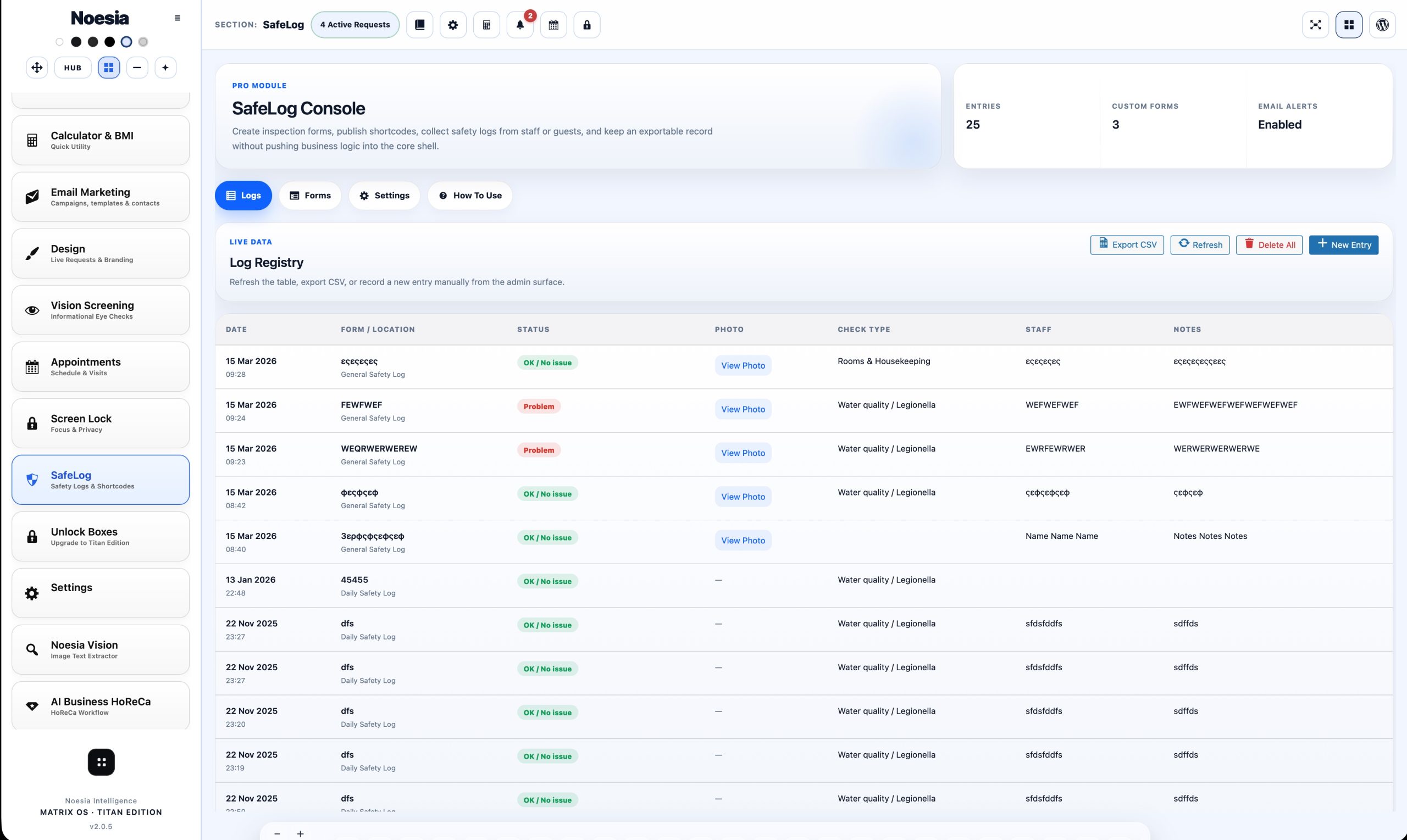
  • Logs tab with date, form, location, status, photo, check type, staff, and notes.
  • Manual admin entry modal for direct backend creation.
  • CSV export for registry and reporting workflows.
  • Delete-all registry cleanup control from the admin side.

Email alerts and operational visibility

  • Optional email notification on each new entry.
  • Recipient email is configurable from settings.
  • Entries stay visible in backend and can also be pushed to email for managers or supervisors.
  • Good for urgent pool, room, safety, and maintenance escalations.
How to Access It

Where SafeLog lives in admin and public flow

Admin path: open the Noesia Smart Waiter admin shell and select SafeLog from the module navigation.

Tier: this module belongs to the Pro layer.

Public path: managers can place a SafeLog shortcode on a normal page and let staff submit from phones, tablets, QR destinations, or role-specific pages without exposing the full backend.

Setup / Configuration

Recommended setup before you roll SafeLog into daily operations

01

Keep the General form or create role-specific forms

Start with the built-in General Safety Log, then add custom forms only where the business benefits from separate check logic such as pool routines, housekeeping rounds, or boiler-room inspections.

02

Define your location and category language

Standardize names for areas, statuses, and inspection types so your exported registry stays readable across shifts, departments, and managers.

03

Place dedicated shortcode pages

Create simple pages for rooms, housekeeping, pool, facilities, or technicians and place the corresponding shortcode there. This keeps the workflow fast and makes QR placement practical.

04

Enable alerts and define retention policy

Turn on email notifications when supervision requires immediate visibility. The current build also includes admin-side clean-registry controls; if your company needs timed automatic retention, that should be defined at deployment level by the responsible developer or operator policy.

How to Use It

Typical inspection flow from page access to manager visibility

Step 1

Open the correct SafeLog form

Use the built-in general form or a custom page dedicated to pool, rooms, plant room, common areas, or any inspection route your company has defined.

Step 2

Fill the structured entry

Enter location, choose check type and status, identify the staff member, and add notes that clearly describe what was checked, observed, or escalated.

Step 3

Add photo proof when needed

Upload a photo when the issue, completed work, or inspection state should be documented visually for a supervisor, manager, or future review.

Step 4

Submit and log the result

The entry is stored in the backend registry, becomes visible in the logs table, and can also trigger a notification email when alerts are enabled.

Step 5

Review, export, and manage lifecycle

Managers review the registry in admin, export CSV when needed, and keep the log set controlled with cleanup actions based on the company’s retention policy.

Screens / Interface Guide

The interface areas that matter most in SafeLog

Logs tab

The main registry shows date, form, location, status, photo state, check type, staff, and notes so management can verify what happened without chasing messages across teams.

Forms tab

This is where the business keeps the built-in general form plus custom form definitions, descriptions, allowed types, statuses, and the shortcode library for deployment.

Settings tab

Controls email notification state and recipient email, which is important when operational reporting must also reach supervisors outside the admin screen.

How to Use tab

The module includes a built-in operational guide that explains how to create forms, place shortcodes, collect logs, and export or alert without guesswork.

New Entry modal

Admins can create a SafeLog entry directly from the backend when a supervisor or operator needs to register an inspection manually instead of using the public page.

Public form

The public-facing form is optimized for quick submission and is ideal for housekeepers, pool operators, technicians, and field staff who only need the reporting surface.

Common Workflows

Real examples of how businesses use SafeLog

Hotel housekeeping room report

A cleaner opens the room or housekeeping form, records the room or area, marks the status, adds notes about missing items or issues, and attaches a photo when the supervisor should verify the condition.

Pool and spa operational check

Pool staff can log water-quality related checks, pool and spa observations, safety remarks, and immediate problems while management receives the result in backend and optional email alert flow.

Technical maintenance escalation

A technician records an observation or problem in a boiler room, plant room, or common area, uploads a photo, and gives the company a traceable service record instead of an informal message.

QR-based field reporting

Managers can place QR-linked pages in back-of-house areas or service routes so the correct form opens immediately on a phone without exposing the rest of the admin environment.

Exportable audit and follow-up registry

The business reviews the registry in admin, exports CSV when needed, and keeps a clearer historical trail for operations, compliance, internal reporting, or dispute review.

Troubleshooting

Common problems, likely causes, and the first fix path

The SafeLog tab is not visible

Issue: the module does not appear in the admin shell.

Why it happens: the account lacks the required capability, the build restricts the module, or the Pro layer did not initialize correctly.

What to do: test with an admin-capable account first and confirm the Pro module surface is active in the current build.

The public form does not save

Issue: staff submit the form but the entry is not created.

Why it happens: location or staff name is missing, the selected status is invalid for that form, or the submission session expired.

What to do: refill the required fields, confirm the form page is the correct one, and retry with a fresh page load.

Email alerts are not arriving

Issue: entries appear in backend but no notification email is received.

Why it happens: email notifications are disabled, the recipient email is wrong, or the hosting mail stack is not delivering normally.

What to do: check the Settings tab first, confirm the recipient email, and then verify that WordPress email sending works on the site.

The wrong statuses or categories appear

Issue: the entry form shows options that do not fit the operational scenario.

Why it happens: the business is using the general form where a dedicated custom form should be used, or the custom form has not been configured cleanly.

What to do: create a location-specific form and define the allowed check types and statuses explicitly for that workflow.

Photos do not attach correctly

Issue: the entry saves but the photo is missing or rejected.

Why it happens: the uploaded file is unsupported, damaged, or blocked by normal upload restrictions.

What to do: retry with a clean JPG, PNG, or WEBP image and confirm the server accepts normal media uploads.

The registry is growing too much

Issue: the company wants stricter control over old logs.

Why it happens: SafeLog can accumulate useful operational history over time.

What to do: use the built-in export and delete controls, and if your organization needs timed automatic retention, have the responsible developer define that policy at deployment level.

The documentation page looks broken in Elementor

Issue: spacing, typography, or layout look wrong after embedding the snippet.

Why it happens: external page CSS overrides the namespaced wrapper.

What to do: keep the snippet self-contained inside the noesia-swa-matrix wrapper and avoid generic selectors outside the isolated surface.

FAQ

Fast answers before opening support

Is SafeLog a Pro module?

Yes. SafeLog belongs to the Pro layer.

Does it include a built-in default form?

Yes. SafeLog always includes the built-in General Safety Log form.

Can I create custom forms?

Yes. You can create custom forms with their own descriptions, check types, statuses, and shortcodes.

Can staff submit without backend access?

Yes. The public shortcode form exists exactly for that use case.

Can housekeeping use it for rooms?

Yes. Rooms and housekeeping are part of the intended SafeLog workflow model.

Can pool operators use it?

Yes. Pool / Spa and water-quality-related checks are part of the default SafeLog logic.

Can technicians attach photo proof?

Yes. SafeLog supports optional image upload with the entry.

Do logs stay in the backend?

Yes. Entries are stored in the backend registry and remain visible in the Logs tab.

Can logs also go to email?

Yes. When notifications are enabled, each new entry can trigger an alert email.

Can I export the registry?

Yes. SafeLog supports CSV export from the admin side.

Does it support QR-oriented deployment?

Yes. Separate shortcode pages make QR-driven reporting practical and easy.

Does the current build include timed automatic cleanup?

Not as a built-in timed retention policy in the module itself. The current build includes backend cleanup controls, while stricter timed retention should be defined by the responsible deployment team if required.

The Noesia Matrix

⚙️ THE NOESIA MATRIX: KERNEL FABRIC ARCHITECTURE

The Noesia Matrix is the shared architecture language and module fabric behind Noesia Smart Waiter. This module is not just a static page; it sits inside an isolate-first modular system designed for shell-driven navigation, clean section ownership, extensible widget zones, and future-safe expansion.

The architecture direction is intentionally high-control: modular ownership, isolated assets, lazy-ready behavior, clean settings flow, predictable prefixes, maintainable service boundaries, and enterprise-safe discipline around structure, security, and extensibility. Noesia transcends the definition of a standard WordPress plugin, operating as a robust platform built upon enterprise-grade Service-Oriented Design.

Here is how the core engine is designed to minimize bloat, maximize stability, and keep the experience consistently fast and responsive:

Event-Driven Inversion of Control (IoC): The platform follows an IoC pattern via a decoupled Event Bus. The central core acts as a “Logic-Less Host” (Blind / DUMMY Kernel). It does not tightly bind itself to module internals; modules announce their own presence, capabilities, and state through controlled registration flows.

The Micro-Frontend Paradigm (MFE): The UI is not a giant monolithic block. Each application behaves as an independent Micro-Frontend with its own dynamic assets, specialized logic, and UI contracts.

Strict Asset Isolation & Lazy-Loading: Resource usage stays disciplined. A module’s CSS, JavaScript, and data components are loaded only when the user reaches or interacts with that specific application surface.

Decoupled Registry Pattern: The dynamic discovery layer allows applications to be added or removed quickly without rewriting core logic. If one application encounters an issue, the architecture is designed to contain that impact instead of cascading it across the platform.

Enterprise-Grade Security & Stability: The platform is reinforced with strict input sanitization, dynamic registry routing, and defensive safety gates across the stack. The data layer and the user interface remain deliberately separated for maintainability and risk control.

The Result: A scalable hospitality and clinical operating system engineered to manage mission-critical workflows securely — from intimate cafés to high-traffic venues and sensitive medical environments.

Support

Support, escalation, and what to send first

Check first

  • Confirm the plugin version.
  • Confirm the module name is SafeLog.
  • Check whether the issue is about forms, entries, email alerts, photos, or exports.
  • Review the troubleshooting section above first.

Collect before opening a ticket

  • One clear screenshot of the issue.
  • The exact visible error or wrong result state.
  • Short steps to reproduce.
  • Whether the issue happens always or only sometimes.

Open support only after the fast checks above

When you open a ticket, include one clean screenshot, the exact visible error text or wrong state, short reproduction steps, and whether the problem is constant or intermittent. That reduces back-and-forth and speeds up resolution.

Open Support
Explore Modules

Explore all modules of Noesia Smart Waiter

Enter the application layer: Explore the full Noesia Smart Waiter ecosystem and discover how each isolated module helps serve hospitality, operations, business workflows, and the wider mission to reimagine life through smarter software.

Scroll into the Matrix: The catalog below is the live gateway to the platform. Move through Free and Pro environments, open each documentation page, and step directly into the next application surface.

The Noesia Matrix · Applications Layer

Explore TheMatrix Ecosystem

The Micro-Frontend Catalog: Every application listed below operates as its own isolated environment. Search, filter, and discover the tools that expand daily operations without turning the platform into a bloated monolith.

Seamless Navigation: The Free layer covers essential operational foundations, while the Pro environments unlock advanced, enterprise-grade workflows. Select any module to open its dedicated documentation page and setup path.

Total Modules 34 Current mapped layer from the uploaded snapshot, with additional modules already planned for the next release window.
Free Layer 17 Green-tag modules ready for the open layer of the platform.
Pro Layer 17 Purple-tag modules mapped to the premium operational surface.
No modules matched the current filter or search query. Clear the search or switch filters to reveal more applications.

Built for real operations: every module in the Matrix is designed around self-hosted control, isolated loading, fast response surfaces, security-first structure, and a support-ready documentation flow built to scale with modern businesses.

Documentation Hub
