Owners and strategy-focused managers
Useful when you want official tourism, macro, labour, demographic, or digital indicators to support real business thinking instead of random web summaries.

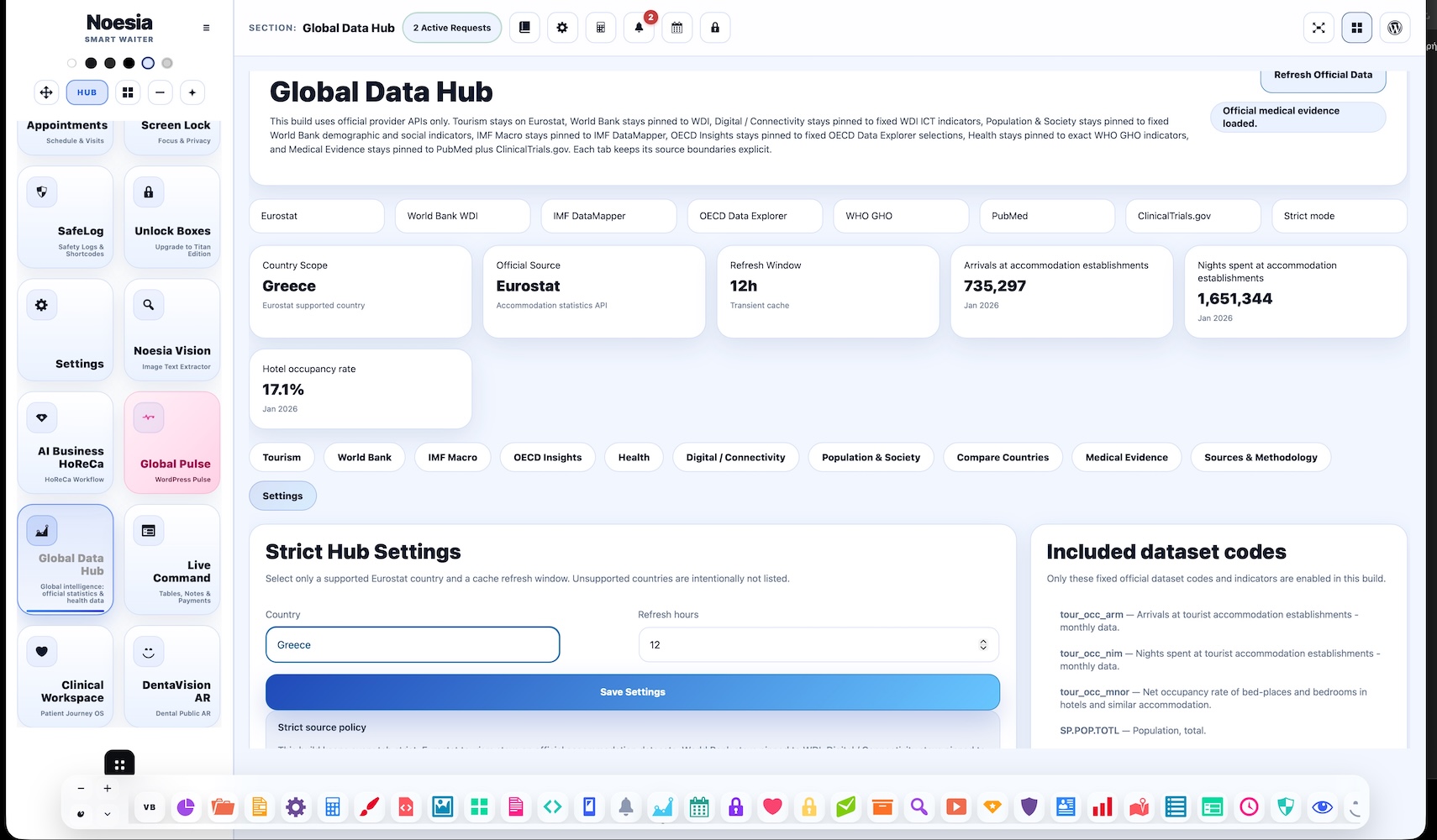
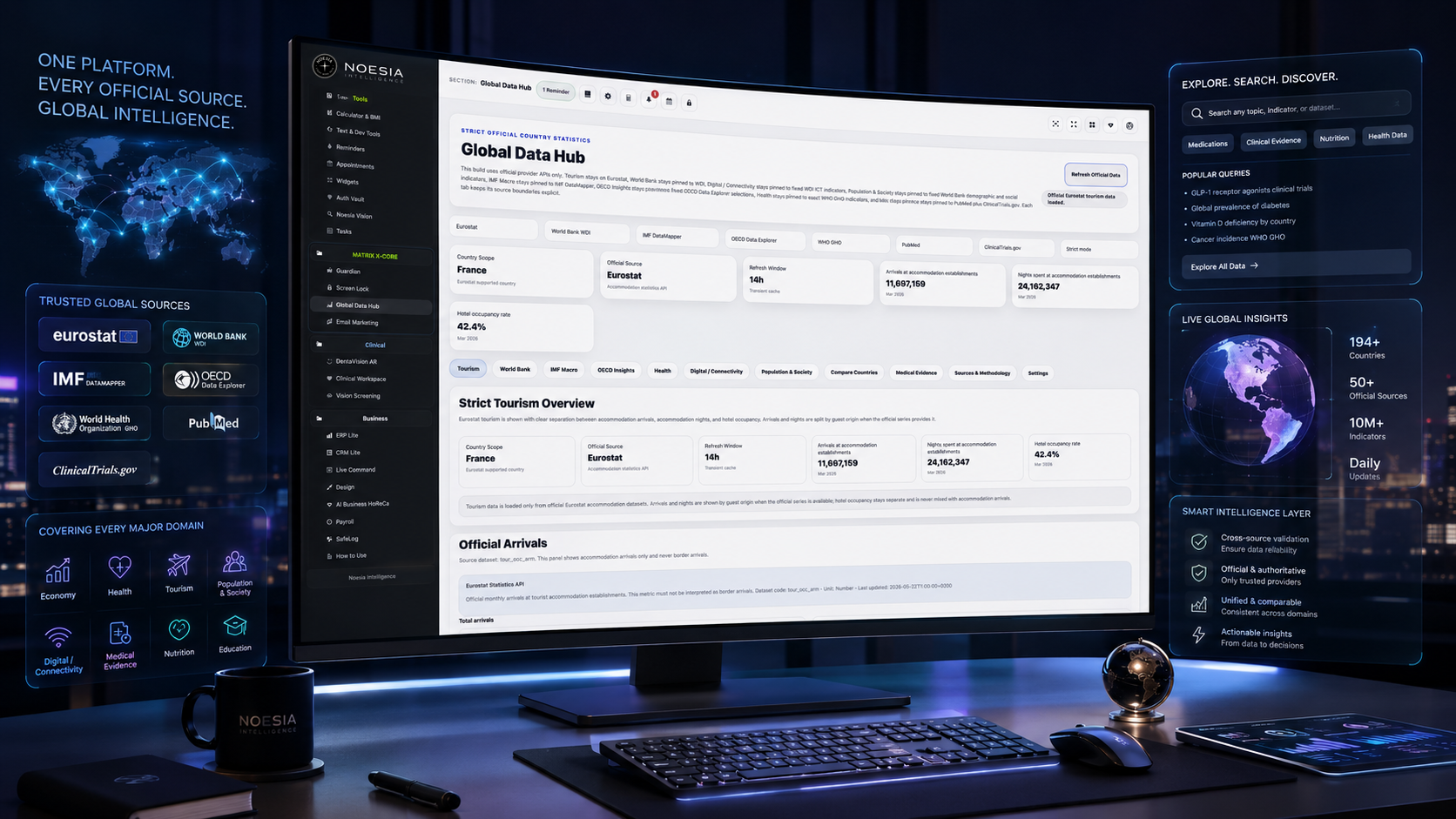
Global Data Hub is the strict official-data intelligence layer of Noesia Smart Waiter. It brings together curated public-data tabs for tourism, development, IMF macro indicators, OECD labour insights, WHO health metrics, digital and population indicators, country comparison, and medical evidence search using official provider APIs with country-aware settings and controlled source policy.
Useful when you want official tourism, macro, labour, demographic, or digital indicators to support real business thinking instead of random web summaries.
Useful when the installation needs a country-aware data deck with fixed official providers, structured tabs, and strict source discipline.
Useful when the team wants official PubMed and ClinicalTrials.gov search inside the same application shell rather than switching between disconnected tools.
Power begins when global information becomes structured, searchable, and understandable. Inside Noesia Matrix OS X_Code, the Global Data Hub was built as a planetary statistics and intelligence workspace — a place where users can feel the pulse of the world through official data, economic indicators, health metrics, tourism signals, population trends, digital connectivity and medical evidence.
This is not a random dashboard. It is a structured global data layer connected to serious sources — built to move the user from scattered numbers to visible intelligence.
A user can explore tourism through accommodation arrivals, nights spent, hotel occupancy and country-level travel signals. They can inspect development and economic metrics such as GDP, GDP per capita, trade, unemployment, electricity access, internet usage, life expectancy, carbon emissions and urban population.
They can compare countries, understand demographic structure, inspect digital connectivity, and enter the health layer through WHO indicators such as universal health coverage, maternal mortality, under-five mortality, neonatal mortality and government health spending.
And then the system goes deeper. Through Medical Evidence, the user can search medical, pharmaceutical, nutrition and clinical topics through PubMed and ClinicalTrials.gov — not as medical advice, but as an evidence exploration layer connected to official research ecosystems.
This is what Noesia is building: not another plugin, not another disconnected chart, not another SaaS tab — but an OS where global intelligence, business operations, hospitality, private data, clinical workflows, media tools and productivity layers live inside one modular environment.
Admin path: open the Noesia Smart Waiter admin area and select Global Data Hub from the plugin shell navigation.
Tier: this module is part of the Free tier.
Role expectation: usually intended for administrators, managers, analysts, and research-oriented operators who need official data surfaces.
Start in the Settings tab and select one supported country scope. This country becomes the base context for the strict official-data tabs.
Choose the cache refresh period in hours so the hub balances fresh output with stable request behavior.
Review the Sources & Methodology tab so the team understands exactly which official providers and indicators are active in the build.
Load compare-country views only when you need side-by-side context, and use Medical Evidence when the topic needs official literature or trial registry lookup.
Start here when you need structured official context instead of opening many public websites one by one.
Set the supported country and cache window in Settings so the rest of the tabs work from the intended scope.
Use the tourism, development, IMF, OECD, health, digital, or population tab depending on the question you are trying to answer.
Move to Compare Countries for side-by-side official deck loading, or to Medical Evidence for PubMed and ClinicalTrials.gov topic searches.
Use the methodology tab to understand which exact provider families and strict rules are active before presenting the output as decision support.
This section focuses on official accommodation arrivals, nights, and hotel occupancy logic using strict Eurostat handling.
Development, digital, population, OECD, IMF, and health tabs render structured mini-cards plus official indicator histories.
The compare screen includes a primary country plus separate compare-country selectors to build a strict multi-country deck.
The medical tab accepts a topic query and renders official PubMed and ClinicalTrials.gov results inside the app interface.
This is where the user sees which official providers, dataset families, and strict source rules are currently active.
The settings screen controls the supported country scope and cache refresh window that drive the rest of the module.
Pick a supported country, review tourism, development, and IMF macro tabs, then use the result as a stronger planning context for business decisions.
Set the primary country and additional comparison countries, then load the strict comparison deck for tourism, GDP per capita, life expectancy, internet use, and related context.
Move from WHO health indicators into PubMed and ClinicalTrials.gov searches when a health topic needs both indicator context and evidence lookup.
Check the methodology tab before presenting conclusions so the team understands which provider APIs and strict display rules shaped the data.
Issue: the tab loads but the indicator or series stays unavailable.
Why it happens: the strict source policy intentionally hides unresolved or unsupported official series instead of guessing.
What to do: confirm the country is supported, reload the tab, and check the Sources & Methodology section before assuming the data is missing by mistake.
Issue: the user changes country but the output feels incomplete or unchanged.
Why it happens: the country may not be mapped cleanly for a given provider family, or cached output may still be active until refresh clears.
What to do: re-save the Settings tab, confirm the country is in the supported list, and wait for the refresh logic or cache clear path to take effect.
Issue: the medical tab runs but the result quality is poor.
Why it happens: the topic query may be too vague, too broad, or not phrased in a way that maps well to official literature search.
What to do: refine the search topic into a clearer medical phrase and rerun the PubMed / ClinicalTrials search with more precise wording.
Issue: the compare deck does not expose every metric the user expects.
Why it happens: the module is intentionally strict and uses a curated comparison set rather than an unlimited free-form dashboard.
What to do: treat the compare deck as a controlled official summary and use the main tabs when you need deeper provider-specific detail.
Yes. It belongs to the free tier and acts as the strict official-data intelligence surface of the platform.
It is built around Eurostat, World Bank WDI, IMF DataMapper / WEO, OECD Data Explorer, WHO GHO, PubMed, and ClinicalTrials.gov.
Yes. The Settings tab includes a supported country selector and a refresh-hours control for the country-scoped cache.
Yes. The Compare Countries tab provides a primary country and additional compare-country selectors for a controlled official comparison deck.
Yes. The Medical Evidence tab searches official PubMed and ClinicalTrials.gov sources inside the app.
Because the strict source policy prefers hiding unresolved official series instead of showing guessed or ambiguous data.
Yes. The refresh window is configurable in hours, typically within a controlled 1 to 72 hour range.
No. Tourism is only one tab. The module also covers development, macro, labour, health, digital, population, compare, and medical evidence layers.
Yes. A dedicated Sources & Methodology tab explains the active official providers and strict source policy.
No. It is best used as a controlled official-data surface inside the app, then extended with deeper specialist research when needed.
Because the module is designed around strict provider mapping and controlled dataset behavior rather than uncontrolled guessing.
Yes. Business users benefit from tourism and macro decks, while clinical users can also use the health and medical evidence layers.
The Noesia Matrix is the shared architecture language and module fabric behind Noesia Smart Waiter. This module is not just a static page; it sits inside an isolate-first modular system designed for shell-driven navigation, clean section ownership, extensible widget zones, and future-safe expansion.
The architecture direction is intentionally high-control: modular ownership, isolated assets, lazy-ready behavior, clean settings flow, predictable prefixes, maintainable service boundaries, and enterprise-safe discipline around structure, security, and extensibility. Noesia transcends the definition of a standard WordPress plugin, operating as a robust platform built upon enterprise-grade Service-Oriented Design.
Here is how the core engine is designed to minimize bloat, maximize stability, and keep the experience consistently fast and responsive:
Event-Driven Inversion of Control (IoC): The platform follows an IoC pattern via a decoupled Event Bus. The central core acts as a “Logic-Less Host” (Blind / DUMMY Kernel). It does not tightly bind itself to module internals; modules announce their own presence, capabilities, and state through controlled registration flows.
The Micro-Frontend Paradigm (MFE): The UI is not a giant monolithic block. Each application behaves as an independent Micro-Frontend with its own dynamic assets, specialized logic, and UI contracts.
Strict Asset Isolation & Lazy-Loading: Resource usage stays disciplined. A module’s CSS, JavaScript, and data components are loaded only when the user reaches or interacts with that specific application surface.
Decoupled Registry Pattern: The dynamic discovery layer allows applications to be added or removed quickly without rewriting core logic. If one application encounters an issue, the architecture is designed to contain that impact instead of cascading it across the platform.
Enterprise-Grade Security & Stability: The platform is reinforced with strict input sanitization, dynamic registry routing, and defensive safety gates across the stack. The data layer and the user interface remain deliberately separated for maintainability and risk control.
The Result: A scalable hospitality and clinical operating system engineered to manage mission-critical workflows securely — from intimate cafés to high-traffic venues and sensitive medical environments.
When you open a ticket, include one clean screenshot, the exact visible error text, short reproduction steps, the active country scope, and the tab that failed. That reduces back-and-forth and speeds up resolution.
Open SupportEnter the application layer: Explore the full Noesia Smart Waiter ecosystem and discover how each isolated module helps serve hospitality, operations, business workflows, and the wider mission to reimagine life through smarter software.
Scroll into the Matrix: The catalog below is the live gateway to the platform. Move through Free and Pro environments, open each documentation page, and step directly into the next application surface.